

SQL Triggers Explained: BEFORE, AFTER and INSTEAD OF Examples
Learn SQL triggers with runnable SQLite examples: AFTER INSERT stock updates, audit logs with OLD and NEW, BEFORE checks and INSTEAD OF triggers on views.
Every time 500 rupees leaves your bank account, an SMS arrives within seconds: "Rs 500 debited, balance Rs 1,500". You never asked for that message. Nobody at the bank pressed a button. The debit itself caused it, every single time, whether you paid by UPI, card or cheque.
The bank set one rule: when a debit happens on an account, then send a message using the old and new balance. Every channel that moves money triggers it, so no channel can forget.
A database has the same feature. The debit is a triggering event (an INSERT, UPDATE or DELETE). The rule is a trigger. The balance before and after are the OLD and NEW rows that the trigger can read.
A SQL trigger is a named block of SQL attached to a table that the database executes automatically before, after or instead of an INSERT, UPDATE or DELETE on that table.
This article follows stored procedures and functions. A procedure runs when someone calls it; a trigger runs when data changes. Unlike procedures, triggers exist in SQLite, so every example here runs in your browser.
How does a SQL trigger work?
A trigger is defined by three choices: the table it watches, the event (INSERT, UPDATE or DELETE), and the timing (BEFORE, AFTER or INSTEAD OF). A row-level trigger then runs once for every row the statement touches.
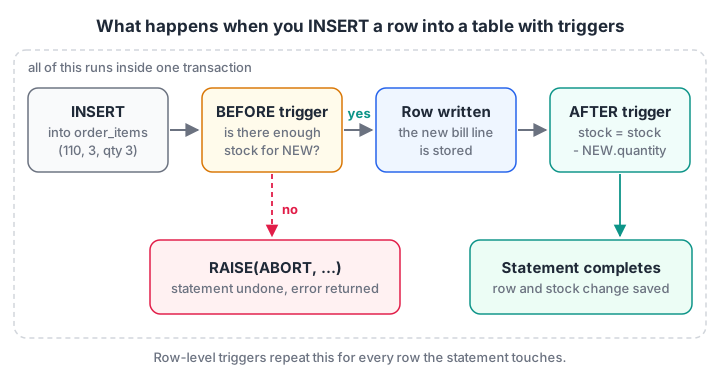
The trigger runs inside the same transaction as the statement. If any trigger raises an error, the statement and everything its triggers did are undone.
The basic shape in SQLite:
CREATE TRIGGER trigger_name
{BEFORE | AFTER | INSTEAD OF} {INSERT | UPDATE [OF column] | DELETE} ON table_name
[WHEN condition]
BEGIN
    -- one or more statements, each ending with ;
END;
An AFTER INSERT trigger that updates stock
Malwa Mart keeps a stock count on each product. Every bill line in order_items should reduce it. Instead of trusting every till, app and import script to remember, a trigger does it.
import sqlite3

con = sqlite3.connect(":memory:")
con.executescript("""
CREATE TABLE products (product_id INTEGER PRIMARY KEY, product_name TEXT, category TEXT, price INT, stock INT);
CREATE TABLE order_items (order_id INT, product_id INT, quantity INT, PRIMARY KEY (order_id, product_id));
INSERT INTO products VALUES (2,'Toor Dal 1kg','Grocery',165,40), (3,'Poha 1kg','Grocery',60,25), (8,'Sev 500g','Snacks',120,30);

CREATE TRIGGER trg_items_reduce_stock
AFTER INSERT ON order_items
FOR EACH ROW
BEGIN
    UPDATE products SET stock = stock - NEW.quantity WHERE product_id = NEW.product_id;
END;
""")
print("Before:", con.execute("SELECT product_name, stock FROM products").fetchall())
# order 110 from the sample data: 1 dal, 1 sev, 3 poha
con.executemany("INSERT INTO order_items VALUES (?, ?, ?)", [(110, 2, 1), (110, 8, 1), (110, 3, 3)])
print("After: ", con.execute("SELECT product_name, stock FROM products").fetchall())
One INSERT statement wrote three rows, so the trigger fired three times. Dal drops from 40 to 39, sev from 30 to 29 and poha from 25 to 22. NEW.quantity and NEW.product_id are the values of the row being inserted.
What are OLD and NEW in a trigger?
Row triggers can read the row involved in the change through two names. Which ones exist depends on the event.
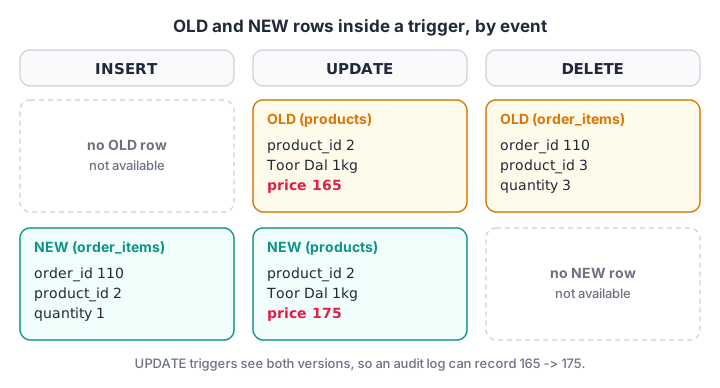
An INSERT has no "before" row, and a DELETE has no "after" row. An UPDATE has both, which makes it ideal for change logs.
| Event | OLD | NEW | Typical trigger |
|---|---|---|---|
| INSERT | Not available | The row being added | Update stock, fill defaults |
| UPDATE | The row before the change | The row after the change | Audit log of price changes |
| DELETE | The row being removed | Not available | Archive deleted rows |
An audit log with AFTER UPDATE
When the price of dal changes, the owner wants to know the old price, the new price and when it changed. UPDATE OF price limits the trigger to that column, and WHEN skips updates that do not really change it.
import sqlite3

con = sqlite3.connect(":memory:")
con.executescript("""
CREATE TABLE products (product_id INTEGER PRIMARY KEY, product_name TEXT, category TEXT, price INT);
CREATE TABLE price_log (product_id INT, old_price INT, new_price INT, changed_at TEXT);
INSERT INTO products VALUES (1,'Basmati Rice 5kg','Grocery',520), (2,'Toor Dal 1kg','Grocery',165), (5,'Paneer 200g','Dairy',90);

CREATE TRIGGER trg_products_price_log
AFTER UPDATE OF price ON products
FOR EACH ROW
WHEN OLD.price <> NEW.price
BEGIN
    INSERT INTO price_log VALUES (NEW.product_id, OLD.price, NEW.price, datetime('now'));
END;
""")
con.execute("UPDATE products SET price = 175 WHERE product_id = 2")            # real change
con.execute("UPDATE products SET price = price WHERE category = 'Grocery'")     # no real change
con.execute("UPDATE products SET product_name = 'Paneer 200g Fresh' WHERE product_id = 5")  # other column
for row in con.execute("SELECT product_id, old_price, new_price FROM price_log"):
    print(row)
Only one log row appears: dal moved from 165 to 175. The second UPDATE touched two rows but changed nothing, so WHEN filtered it out. The third changed a different column, so UPDATE OF price never fired. datetime('now') stores UTC time.
Quick check
In an AFTER DELETE trigger, which row values can you read?
A deleted row has a before state but no after state, so only OLD is available. UPDATE triggers get both.
Using BEFORE triggers to block bad data
A BEFORE trigger runs before the row is written, so it can stop the change. In SQLite, the RAISE() function aborts the statement with your own message.
import sqlite3

con = sqlite3.connect(":memory:")
con.executescript("""
CREATE TABLE products (product_id INTEGER PRIMARY KEY, product_name TEXT, price INT, stock INT);
CREATE TABLE order_items (order_id INT, product_id INT, quantity INT, PRIMARY KEY (order_id, product_id));
INSERT INTO products VALUES (1,'Basmati Rice 5kg',520,4), (7,'Detergent 2kg',340,10);

CREATE TRIGGER trg_items_check_stock
BEFORE INSERT ON order_items
FOR EACH ROW
WHEN NEW.quantity > (SELECT stock FROM products WHERE product_id = NEW.product_id)
BEGIN
    SELECT RAISE(ABORT, 'Not enough stock for this product');
END;
CREATE TRIGGER trg_items_reduce_stock AFTER INSERT ON order_items
BEGIN
    UPDATE products SET stock = stock - NEW.quantity WHERE product_id = NEW.product_id;
END;
""")
for line in [(107, 1, 3), (112, 7, 2), (113, 1, 2)]:
    try:
        con.execute("INSERT INTO order_items VALUES (?, ?, ?)", line)
        print("saved  ", line)
    except sqlite3.IntegrityError as err:
        print("blocked", line, "->", err)
print(con.execute("SELECT product_name, stock FROM products").fetchall())
Order 107's three bags of rice leave one in stock, so the next request for two is blocked. RAISE(ABORT, ...) undoes the current statement and raises an error, which Python reports as IntegrityError. Other options are ROLLBACK (end the whole transaction), FAIL and IGNORE (silently skip the row).
Quick check
A BEFORE INSERT trigger runs SELECT RAISE(ABORT, 'Not enough stock'). What happens to the INSERT?
RAISE(ABORT) stops the current statement, reverses what it changed and returns an error to the application.
INSTEAD OF triggers: making a view writable
The SQL views article showed that SQLite refuses an INSERT into a view. An INSTEAD OF trigger tells the database what to do instead: here, insert into the real table and supply a default city.
import sqlite3

con = sqlite3.connect(":memory:")
con.executescript("""
CREATE TABLE customers (customer_id INTEGER PRIMARY KEY, name TEXT, city TEXT, phone TEXT);
INSERT INTO customers VALUES (1,'Asha Verma','Indore','9826011234'), (3,'Meera Joshi','Dewas','9826033456');
CREATE VIEW customer_directory AS SELECT customer_id, name, city FROM customers;

CREATE TRIGGER trg_directory_insert
INSTEAD OF INSERT ON customer_directory
BEGIN
    INSERT INTO customers (customer_id, name, city) VALUES (NEW.customer_id, NEW.name, COALESCE(NEW.city, 'Indore'));
END;
""")
con.execute("INSERT INTO customer_directory VALUES (8, 'Rohit Gupta', NULL)")
print(con.execute("SELECT * FROM customers").fetchall())
Rohit is now a real customer with city Indore and no phone number. The view stays a security layer, and the trigger decides exactly which columns a write through it may touch.
Trigger syntax in MySQL and PostgreSQL
The ideas are identical, but the syntax differs a lot.
-- MySQL 8: the body is written directly in the trigger
DELIMITER //
CREATE TRIGGER trg_items_check_stock
BEFORE INSERT ON order_items
FOR EACH ROW
BEGIN
    IF NEW.quantity > (SELECT stock FROM products WHERE product_id = NEW.product_id) THEN
        SIGNAL SQLSTATE '45000' SET MESSAGE_TEXT = 'Not enough stock for this product';
    END IF;
END //
DELIMITER ;

-- PostgreSQL 16: a trigger calls a function that RETURNS trigger
CREATE OR REPLACE FUNCTION reduce_stock() RETURNS trigger
LANGUAGE plpgsql AS $$
BEGIN
    UPDATE products SET stock = stock - NEW.quantity WHERE product_id = NEW.product_id;
    RETURN NEW;
END;
$$;

CREATE TRIGGER trg_items_reduce_stock
AFTER INSERT ON order_items
FOR EACH ROW EXECUTE FUNCTION reduce_stock();| Feature | SQLite | MySQL 8 | PostgreSQL 16 |
|---|---|---|---|
| Body | Inline BEGIN ... END |
Inline BEGIN ... END |
A separate trigger function |
| Row-level triggers | Yes (the only kind) | Yes (the only kind) | Yes |
Statement-level (FOR EACH STATEMENT) |
No | No | Yes |
INSTEAD OF on views |
Yes | No | Yes |
| Change NEW in a BEFORE trigger | No (update the row afterwards) | SET NEW.col = ... |
NEW.col := ...; RETURN NEW; |
| Raise an error | RAISE(ABORT, 'msg') |
SIGNAL SQLSTATE '45000' |
RAISE EXCEPTION 'msg' |
| Drop | DROP TRIGGER name; |
DROP TRIGGER name; |
DROP TRIGGER name ON table; |
MySQL also refuses a trigger that modifies the same table it is attached to, so a trigger on order_items cannot update order_items.
Common mistakes with SQL triggers
- Hidden business logic. A new team member runs an INSERT and stock changes "by magic". Name triggers clearly (
trg_table_purpose) and document them. - Slow bulk loads. A row trigger on a table loaded with 1 million rows runs 1 million times. Disable or drop it during large imports where your database allows, and rebuild derived values after.
- Chains of triggers. Trigger A updates table B, whose trigger updates table C. Debugging that chain is painful. Keep triggers small and one level deep where possible.
- Using a trigger where a constraint works. NOT NULL, CHECK, UNIQUE and FOREIGN KEY are clearer and faster.
- Forgetting UPDATE OF and WHEN. Without them, an audit trigger fires on every update, even ones that change nothing.
Triggers are a favourite interview topic because they test whether you understand transactions and side effects together. Learners in Debugshala's Indore analytics batch build stock and audit triggers on retail tables, and database MCQ rounds on Debugshala Test check the theory. Next, SQL query optimisation shows how to find and fix slow queries.
Key takeaways
- A trigger runs automatically on INSERT, UPDATE or DELETE, with BEFORE, AFTER or INSTEAD OF timing.
- NEW is the incoming row (INSERT, UPDATE); OLD is the previous row (UPDATE, DELETE).
- Use AFTER triggers for side effects such as stock and audit logs, BEFORE triggers for cross-table checks, and INSTEAD OF triggers for writable views.
UPDATE OF columnandWHENstop a trigger firing when it does not need to.- Triggers run in the statement's transaction, so an error undoes the whole change; prefer constraints for simple rules.
FAQ
What is a trigger in SQL with an example?
A trigger is SQL code that runs automatically when a table changes. For example, an AFTER INSERT trigger on order_items can reduce the matching product's stock by NEW.quantity each time a bill line is saved, so every till and app updates stock without extra code.
What is the difference between a trigger and a stored procedure?
A stored procedure runs only when an application or user calls it with CALL, and it can take parameters. A trigger cannot be called; it fires automatically when its table receives an INSERT, UPDATE or DELETE, and it reads the changed row through OLD and NEW instead of parameters.
What are the types of triggers in SQL?
Triggers are classified by timing and event. Timing is BEFORE, AFTER or INSTEAD OF, and the event is INSERT, UPDATE or DELETE, giving combinations such as AFTER UPDATE. They are also row-level, running once per row, or statement-level, running once per statement; only PostgreSQL among these three databases supports statement-level triggers.
Are triggers bad for performance?
Triggers add work to every write they fire on, so a heavy trigger on a busy table slows inserts and updates. Small triggers that update one row or insert one log row are usually fine. Problems appear with bulk loads, chains of triggers and triggers that run slow queries.
Is there a SQL course in Indore that covers triggers and procedures?
Yes. Debugshala in Old Palasia, Indore, teaches SQL from SELECT queries through views, transactions, procedures and triggers in its Data Analytics course. Teaching is offline in English and Hindi, the course accepts non-IT graduates and people with a year gap, placement assistance is offered, and a free demo class is available before enrolment.
From the team behind this site
Go further with the Data Analytics Course at Debugshala
These tutorials are written by Debugshala, a training and placement institute at Old Palasia, Indore. The classroom course adds live mentoring, real projects and interview preparation.
- Offline classes at Old Palasia, Indore
- Free demo class before you pay
- Non-IT, fresher and year-gap friendly
- Placement assistance
700+ students placed · 200+ hiring partners · 4.9★ Google rating
