

SQL Query Optimization: Practical Ways to Speed Up Slow Queries
Speed up slow SQL queries: read EXPLAIN plans, write sargable filters, replace correlated subqueries, fix N+1 queries and use keyset pagination, with timings.
Your mother hands you a list of twelve items for the kirana shop. You could walk to the shop, buy the rice, walk home, walk back for the dal, and repeat twelve times. You would get every item, and it would take all evening.
Or you take the whole list in one trip. At the shop, you go straight to the right shelves instead of reading every label in the store, and you carry home only what is on the list, not a sample of everything.
Slow SQL fails in the same three ways. Twelve trips are twelve round trips between your program and the database. Reading every label is a full table scan. Carrying home everything is SELECT * when you need two columns. Fixing those is query optimization.
SQL query optimization is the practice of rewriting queries, adding the right indexes and reducing round trips so the database returns the same result while reading and processing far less data.
This article closes the Database Design part of the series after SQL triggers. It builds directly on SQL indexes, so read that first if B-trees and EXPLAIN plans are new to you.
How does the database decide how to run a query?
You write what you want; the database's query planner decides how to get it. For each query it considers options, such as scanning the table or using an index, estimates their cost and picks the cheapest.
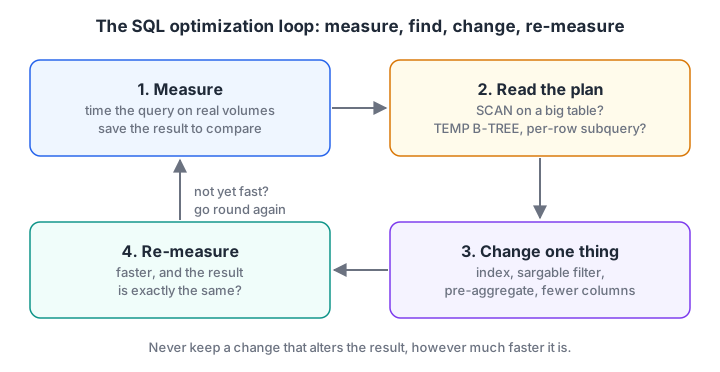
Optimization is a loop, not a guess. Each change is judged by the plan and the timing, and by whether the result stayed the same.
That gives you a simple procedure for any slow query:
- Measure. Time the query on realistic data and save its result.
- Read the plan. Look for full scans of large tables, temporary sorts and subqueries that run once per row.
- Change one thing. Add an index, rewrite a filter or restructure a subquery.
- Re-measure. Compare time and plan, and check the result matches the saved one.
| What the plan says | SQLite wording | MySQL EXPLAIN |
PostgreSQL EXPLAIN ANALYZE |
|---|---|---|---|
| Reads every row | SCAN orders |
type: ALL |
Seq Scan |
| Uses an index | SEARCH orders USING INDEX ... |
type: ref / range |
Index Scan, Bitmap Index Scan |
| Extra sort step | USE TEMP B-TREE FOR ORDER BY |
Using filesort |
Sort node |
| Subquery per row | CORRELATED SCALAR SUBQUERY |
DEPENDENT SUBQUERY |
SubPlan |
Write filters the index can use
An index on order_date is sorted by the raw date text. A filter that wraps the column in a function, adds to it or casts it hides the column from the index, so the planner falls back to a scan. A filter that can use an index is often called sargable.
The block below builds 20,000 orders, indexes two columns, and prints the plan for pairs of queries that return the same rows.
import sqlite3

con = sqlite3.connect(":memory:")
con.executescript("""
CREATE TABLE orders (order_id INTEGER PRIMARY KEY, customer_id INT, store_id INT, order_date TEXT, amount INT, payment_mode TEXT);
WITH RECURSIVE n(i) AS (SELECT 1 UNION ALL SELECT i + 1 FROM n WHERE i < 20000)
INSERT INTO orders SELECT i, 1 + (i * 7919) % 800, 1 + i % 4, date('2025-01-01', '+' || (i % 365) || ' days'),
       100 + (i * 37) % 1500, CASE i % 3 WHEN 0 THEN 'UPI' WHEN 1 THEN 'Cash' ELSE 'Card' END FROM n;
CREATE INDEX idx_orders_date ON orders (order_date);
CREATE INDEX idx_orders_customer ON orders (customer_id);
""")
pairs = {
    "month filter":  ("SELECT order_id, amount FROM orders WHERE strftime('%Y-%m', order_date) = '2025-06'",
                      "SELECT order_id, amount FROM orders WHERE order_date >= '2025-06-01' AND order_date < '2025-07-01'"),
    "arithmetic":    ("SELECT * FROM orders WHERE customer_id + 1 = 43",
                      "SELECT * FROM orders WHERE customer_id = 42"),
    "sort":          ("SELECT order_id, amount FROM orders ORDER BY amount DESC LIMIT 5",
                      "SELECT order_id, order_date FROM orders ORDER BY order_date DESC LIMIT 5"),
}
for label, (slow, fast) in pairs.items():
    for tag, sql in (("before", slow), ("after ", fast)):
        plan = " | ".join(row[3] for row in con.execute("EXPLAIN QUERY PLAN " + sql))
        print(f"{label:13} {tag}: {plan}")
The month filter with strftime scans; the date range searches the index. customer_id + 1 = 43 scans, while customer_id = 42 searches.
Sorting by amount adds USE TEMP B-TREE FOR ORDER BY, a full sort of 20,000 rows to keep five. Sorting by the indexed order_date has no sort step: SQLite reads the index from the end and stops after five rows.
Other common non-sargable patterns include LIKE '%dal' (a leading wildcard), comparing a text column to a number so the database must convert every value, and OR across two different columns, which often needs two indexes or a UNION ALL rewrite.
Quick check
Which WHERE clause can use an index on order_date?
The range compares the raw column with constants, so the planner can search the sorted index. Wrapping the column in a function or expression forces a scan.
Replace per-row subqueries with one aggregate
A correlated subquery refers to the outer row, so the database may run it once per outer row. "Orders above their own store's average" is a classic example. Written naively, the average is recalculated for every order.
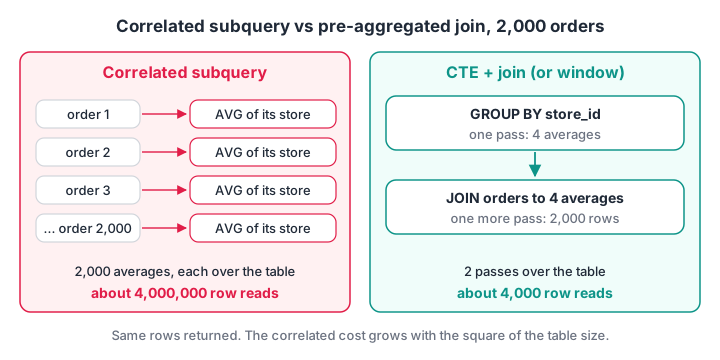
Both queries return the same orders. The rewrite computes each store's average once instead of 2,000 times.
import sqlite3, time

con = sqlite3.connect(":memory:")
con.executescript("""
CREATE TABLE orders (order_id INTEGER PRIMARY KEY, customer_id INT, store_id INT, order_date TEXT, amount INT);
WITH RECURSIVE n(i) AS (SELECT 1 UNION ALL SELECT i + 1 FROM n WHERE i < 2000)
INSERT INTO orders SELECT i, 1 + (i * 7919) % 800, 1 + i % 4, date('2025-01-01', '+' || (i % 365) || ' days'), 100 + (i * 37) % 1500 FROM n;
""")
queries = {
    "correlated": """SELECT o.order_id, o.amount FROM orders o
        WHERE o.amount > (SELECT AVG(x.amount) FROM orders x WHERE x.store_id = o.store_id)""",
    "cte + join": """WITH store_avg AS (SELECT store_id, AVG(amount) AS avg_amount FROM orders GROUP BY store_id)
        SELECT o.order_id, o.amount FROM orders o JOIN store_avg s ON s.store_id = o.store_id
        WHERE o.amount > s.avg_amount""",
    "window":     """SELECT order_id, amount FROM (SELECT order_id, amount,
        AVG(amount) OVER (PARTITION BY store_id) AS avg_amount FROM orders) WHERE amount > avg_amount""",
}
results = {}
for label, sql in queries.items():
    start = time.perf_counter()
    results[label] = sorted(con.execute(sql).fetchall())
    print(f"{label:11} {len(results[label])} rows  {(time.perf_counter() - start) * 1000:7.1f} ms")
print("Same result:", results["correlated"] == results["cte + join"] == results["window"])
On a typical laptop, the correlated version takes a few hundred milliseconds and the rewrites take a few milliseconds, roughly a hundred times faster, with identical rows. The gap grows with the square of the table size, so at 200,000 orders the correlated query would run for many minutes. Your exact numbers will differ, in the browser especially.
Some planners, PostgreSQL's in particular, can rewrite simple correlated subqueries into joins themselves. Do not rely on it: check the plan. The CTE and window function tutorials cover both rewrite styles in depth.
Stop the N+1 query problem
The N+1 problem is the twelve trips to the kirana shop. Code fetches a list of N customers with one query, then runs one more query per customer inside a loop. It is easy to write in Python and in ORMs such as Django and SQLAlchemy, and it is slow because every query pays a fixed cost.
import sqlite3, time

con = sqlite3.connect(":memory:")
con.executescript("""
CREATE TABLE orders (order_id INTEGER PRIMARY KEY, customer_id INT, amount INT);
CREATE INDEX idx_orders_customer ON orders (customer_id);
WITH RECURSIVE n(i) AS (SELECT 1 UNION ALL SELECT i + 1 FROM n WHERE i < 30000)
INSERT INTO orders SELECT i, 1 + (i * 7919) % 3000, 100 + (i * 37) % 1500 FROM n;
""")
customer_ids = [r[0] for r in con.execute("SELECT DISTINCT customer_id FROM orders")]

start = time.perf_counter()
loop_totals = {}
for cid in customer_ids:                      # 1 query for the list + 1 query per customer
    loop_totals[cid] = con.execute("SELECT SUM(amount) FROM orders WHERE customer_id = ?", (cid,)).fetchone()[0]
loop_ms = (time.perf_counter() - start) * 1000

start = time.perf_counter()
set_totals = dict(con.execute("SELECT customer_id, SUM(amount) FROM orders GROUP BY customer_id"))
set_ms = (time.perf_counter() - start) * 1000

print(f"N+1 loop:  {len(customer_ids)} queries, {loop_ms:6.1f} ms")
print(f"One query: 1 query,    {set_ms:6.1f} ms")
print("Same totals:", loop_totals == set_totals)
# a server database adds a network round trip to every query; assume 1 ms each
print(f"With 1 ms per round trip: about {loop_ms + len(customer_ids) + 1:.0f} ms vs {set_ms + 1:.0f} ms")
In an in-memory SQLite database there is no network, so the loop is only somewhat slower here. The last line adds a 1 ms round trip per query, a modest figure for a MySQL or PostgreSQL server: the loop then takes about three seconds, while the single GROUP BY stays near 15 milliseconds.
The same rule applies to writes. Insert many rows with one executemany() inside one transaction, not one INSERT and COMMIT per row.
Quick check
A Python script fetches 500 customers and then runs one query per customer to get their totals. What is this called?
One query for the list plus N queries in a loop. A single GROUP BY query returns all the totals in one round trip.
Paginate with keyset, not big OFFSETs
LIMIT 20 OFFSET 90000 looks cheap but is not. The database must find and throw away 90,000 rows before returning 20. Keyset pagination remembers the last id shown and asks for rows after it, which an index answers directly.
import sqlite3, time

con = sqlite3.connect(":memory:")
con.executescript("""
CREATE TABLE orders (order_id INTEGER PRIMARY KEY, amount INT);
WITH RECURSIVE n(i) AS (SELECT 1 UNION ALL SELECT i + 1 FROM n WHERE i < 100000)
INSERT INTO orders SELECT i, 100 + (i * 37) % 1500 FROM n;
""")
def timed(sql, params=()):
    start = time.perf_counter()
    for _ in range(20):
        rows = con.execute(sql, params).fetchall()
    return rows, (time.perf_counter() - start) / 20 * 1000

offset_rows, offset_ms = timed("SELECT order_id, amount FROM orders ORDER BY order_id LIMIT 20 OFFSET 90000")
keyset_rows, keyset_ms = timed("SELECT order_id, amount FROM orders WHERE order_id > ? ORDER BY order_id LIMIT 20", (90000,))
print(f"OFFSET page: first id {offset_rows[0][0]}, {offset_ms:.3f} ms")
print(f"Keyset page: first id {keyset_rows[0][0]}, {keyset_ms:.3f} ms")
print("Same page:", offset_rows == keyset_rows)
Both return orders 90,001 to 90,020, and the keyset version is typically 50 to 100 times faster. The cost of OFFSET grows with the page number; keyset stays flat. The trade-off is that keyset cannot jump straight to page 4,500, so it suits "next page" buttons and infinite scroll. The ORDER BY and LIMIT tutorial introduces both clauses.
A checklist of SQL optimization techniques
| Technique | Why it helps | Watch out for |
|---|---|---|
| Index columns used in WHERE, JOIN and ORDER BY | Turns scans into searches | Every index slows writes |
| Keep filters sargable | Lets the planner use the index | Functions, arithmetic, leading % |
| Select only the columns you need | Less data read and sent; may allow a covering index | SELECT * in production code |
| Filter in WHERE, not HAVING | Rows are dropped before grouping | HAVING is for aggregate conditions |
UNION ALL instead of UNION |
Skips the duplicate-removal sort | Use UNION only when duplicates are possible and unwanted |
EXISTS for "has at least one" |
Stops at the first match | Planners often treat IN the same |
| Pre-aggregate, then join | One pass instead of one per row | Check the plan for correlated subqueries |
| One query instead of N+1 | Removes round trips | ORMs hide this; log the SQL they send |
| Keyset pagination | Constant cost per page | No random page jumps |
Refresh statistics with ANALYZE |
Planner estimates match reality | Run after large loads |
ANALYZE exists in all three databases. PostgreSQL's autovacuum runs it automatically; in SQLite, PRAGMA optimize before closing a long-lived connection is the recommended habit.
Common mistakes when optimizing SQL
- Optimizing without measuring. A rewrite that "looks faster" can be slower. Time it and read the plan.
- Testing on tiny data. Eleven orders run fast whatever you write. Generate realistic volumes, as these examples do.
- Changing the result by accident. Turning a LEFT JOIN into an INNER JOIN, or dropping DISTINCT, can speed things up by returning wrong data. Compare outputs.
- Adding an index for every slow query. Ten overlapping indexes slow every write. One composite index often serves several queries.
- Ignoring the application. The slowest part is often the loop around the SQL, not the SQL itself.
Reading a plan and explaining why a rewrite is faster is the kind of answer that stands out in technical rounds. Debugshala's analytics classes with query-tuning labs practise this on large practice tables, and the Debugshala Test coding and SQL rounds let you keep sharp. To put everything from the series to work, try the SQL practice problems next.
Key takeaways
- Measure first: time the query and read its plan before changing anything.
- Make filters sargable so indexes can be used, and index the columns you filter, join and sort on.
- Replace correlated subqueries with a pre-aggregated CTE or a window function.
- Fetch sets of rows in one query rather than looping, and batch writes in one transaction.
- Use keyset pagination for deep pages, and always confirm the optimized query returns the same result.
FAQ
How do I optimize a slow SQL query?
Start by timing it and reading its plan with EXPLAIN. Look for full scans on large tables, temporary sorts and subqueries running per row. Then add an index on the filter or join columns, rewrite non-sargable filters, pre-aggregate subqueries and select fewer columns, re-measuring after each change and checking the result is unchanged.
What is the difference between EXPLAIN and EXPLAIN ANALYZE?
EXPLAIN shows the plan the database intends to use, with estimated costs, without running the query. EXPLAIN ANALYZE, in PostgreSQL and MySQL 8.0.18 and later, actually executes the query and reports real row counts and timings for each step. Use ANALYZE carefully on UPDATE or DELETE, because the change really happens.
Is EXISTS faster than IN in SQL?
Often they perform the same, because modern planners convert both into a semi-join. EXISTS can be faster when the subquery is large and correlated, since it stops at the first match. NOT IN behaves badly when the subquery returns NULL, so NOT EXISTS is the safer choice for anti-joins as well as often faster.
Does SELECT * slow down a query?
It can. SELECT * reads and sends every column, which wastes memory and network time on wide tables, and it prevents covering-index plans that answer a query from the index alone. It also breaks code silently when columns are added. List only the columns you need in production queries.
Can I learn SQL performance tuning in Indore?
Yes. Debugshala, an IT training and placement institute at Old Palasia in Indore, includes query plans, indexing and query rewriting in its Data Analytics course. Classes run offline in English and Hindi, freshers and non-IT graduates are welcome, placement assistance is offered, and you can attend a free demo class before deciding.
From the team behind this site
Go further with the Data Analytics Course at Debugshala
These tutorials are written by Debugshala, a training and placement institute at Old Palasia, Indore. The classroom course adds live mentoring, real projects and interview preparation.
- Offline classes at Old Palasia, Indore
- Free demo class before you pay
- Non-IT, fresher and year-gap friendly
- Placement assistance
700+ students placed · 200+ hiring partners · 4.9★ Google rating
