

SQL CTE (WITH Clause): Common Table Expressions Explained
SQL CTEs explained: WITH clause syntax, chaining multiple CTEs, CTE vs subquery vs view, and recursive CTEs for date ranges and hierarchies.
Every evening at Malwa Mart's Rajwada branch, the cook in the staff canteen prepares dal. She does not do everything in one pot at once. First she washes the dal in one bowl.
Then she chops onions and tomatoes into a second bowl. Then she makes the tadka in a small pan. Only at the end does she combine the bowls.
Each bowl holds an intermediate result with a clear name: "washed dal", "chopped onions". Anyone watching can follow the recipe step by step, and if the dish tastes wrong, she can check each bowl separately.
A complicated SQL query can be cooked the same way. Instead of nesting one subquery inside another inside another, you prepare each intermediate result in its own named "bowl" and combine them at the end. Each bowl is a common table expression, and the WITH keyword is where you lay the bowls out.
A common table expression (CTE) is a temporary, named result set defined with the WITH clause at the start of a SQL statement, which the rest of that statement can reference like a table.
With SQL subqueries, two-level questions quickly become hard to read from the inside out. CTEs let you write the same logic from the top down, in the order you think about it.
What is the syntax of a CTE in SQL?
A CTE has a name, an optional column list, and a query in parentheses. The main query follows directly after.
WITH store_totals AS (                -- step 1: one row per store
    SELECT store_id, SUM(amount) AS revenue
    FROM orders
    GROUP BY store_id
)
SELECT store_id, revenue              -- step 2: use it like a table
FROM store_totals
WHERE revenue > (SELECT AVG(revenue) FROM store_totals);
Read it like a recipe. Step 1 builds store_totals. Step 2 keeps only stores whose revenue beats the average store. The same CTE is used twice, once in FROM and once inside the scalar subquery, without being written twice.
A CTE exists only for the single statement it belongs to. After the semicolon it is gone. To keep a named query permanently, you would create a SQL view instead.
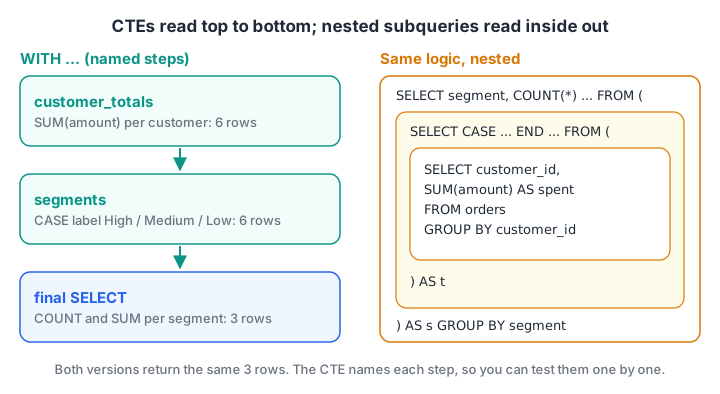
With CTEs, each step has a name and reads top to bottom. The nested-subquery version holds the same logic but must be read from the inside out.
A single CTE, step by step
The four Malwa Mart stores took 5,210 rupees in March, so the average store took 1,302.50. Which stores beat that average? The query above answers it. Here it is running on the series data.
import sqlite3

con = sqlite3.connect(":memory:")
con.executescript("""
CREATE TABLE orders (order_id INT, customer_id INT, store_id INT, order_date TEXT, amount INT, payment_mode TEXT);
INSERT INTO orders VALUES
 (101,1,1,'2026-03-01',1040,'UPI'), (102,2,2,'2026-03-01',330,'Cash'), (103,1,1,'2026-03-03',275,'UPI'),
 (104,3,3,'2026-03-04',180,'Card'), (105,4,2,'2026-03-05',680,'UPI'), (106,2,4,'2026-03-07',120,'Cash'),
 (107,5,3,'2026-03-08',1560,'Card'), (108,6,1,'2026-03-08',220,'UPI'), (109,4,4,'2026-03-10',340,NULL),
 (110,1,2,'2026-03-12',465,'Cash'), (111,6,3,'2026-03-14',NULL,'UPI');
""")

query = """
WITH store_totals AS (
    SELECT store_id, SUM(amount) AS revenue FROM orders GROUP BY store_id
)
SELECT store_id, revenue,
       ROUND(revenue - (SELECT AVG(revenue) FROM store_totals), 1) AS vs_average
FROM store_totals
WHERE revenue > (SELECT AVG(revenue) FROM store_totals)
ORDER BY revenue DESC
"""
for row in con.execute(query):
    print(row)
Three stores beat the average. Bhawarkuan, at 460 rupees, is the only one below it, and it is far enough below to drag the average down for everyone else.
Chaining multiple CTEs
You can define several CTEs in one WITH clause, separated by commas. Each CTE can use any CTE defined above it. This is where CTEs really pay off.
The owner wants a customer segment report: how many customers spent 1,000 rupees or more in March, how many spent 400 to 999, and how many spent less. That is three steps:
customer_totals: total spend per customer.segments: label each customer High, Medium or Low with CASE WHEN.- The final SELECT: count customers and revenue per segment.
import sqlite3

con = sqlite3.connect(":memory:")
con.executescript("""
CREATE TABLE orders (order_id INT, customer_id INT, store_id INT, order_date TEXT, amount INT, payment_mode TEXT);
INSERT INTO orders VALUES
 (101,1,1,'2026-03-01',1040,'UPI'), (102,2,2,'2026-03-01',330,'Cash'), (103,1,1,'2026-03-03',275,'UPI'),
 (104,3,3,'2026-03-04',180,'Card'), (105,4,2,'2026-03-05',680,'UPI'), (106,2,4,'2026-03-07',120,'Cash'),
 (107,5,3,'2026-03-08',1560,'Card'), (108,6,1,'2026-03-08',220,'UPI'), (109,4,4,'2026-03-10',340,NULL),
 (110,1,2,'2026-03-12',465,'Cash'), (111,6,3,'2026-03-14',NULL,'UPI');
""")

query = """
WITH customer_totals AS (
    SELECT customer_id, SUM(amount) AS spent FROM orders GROUP BY customer_id
),
segments AS (
    SELECT customer_id, spent,
           CASE WHEN spent >= 1000 THEN 'High' WHEN spent >= 400 THEN 'Medium' ELSE 'Low' END AS segment
    FROM customer_totals
)
SELECT segment, COUNT(*) AS customers, SUM(spent) AS revenue
FROM segments
GROUP BY segment
ORDER BY revenue DESC
"""
for row in con.execute(query):
    print(row)
Three customers are High value and together bring in 4,360 of the 5,210 rupees, about 84%. That is a much stronger story for a loyalty programme than any single number. If the segments look wrong, you can debug by changing the final SELECT to SELECT * FROM segments and checking that bowl alone.
Quick check
How do you define two CTEs, a and b, in one query?
WITH appears once, and each further CTE follows a comma. b can also refer to a.
CTE vs subquery vs view vs temporary table
| CTE | Subquery in FROM | View | Temporary table | |
|---|---|---|---|---|
| Has a name | Yes | Alias only | Yes | Yes |
| Lives for | One statement | One statement | Until dropped | The session |
| Reusable inside the query | Yes, many times | No, repeat it | Yes | Yes |
| Stores data | Usually no | No | No | Yes |
| Recursion | Yes | No | Only via a recursive CTE inside it | No |
| Best for | Readable multi-step queries | Short one-off steps | Shared logic for a team or BI tool | Big intermediate results reused many times |
On performance: PostgreSQL 12 and later usually inline a CTE that is referenced once, so it runs as fast as the equivalent subquery. You can force the old behaviour with WITH x AS MATERIALIZED (...). SQLite 3.35+ accepts the same MATERIALIZED and NOT MATERIALIZED hints. MySQL decides on its own.
What is a recursive CTE?
A recursive CTE refers to itself. It has two parts joined by UNION ALL:
- The anchor member runs once and produces the starting rows.
- The recursive member reads the rows produced in the previous round and produces the next round.
- The database repeats step 2 until a round produces no rows.
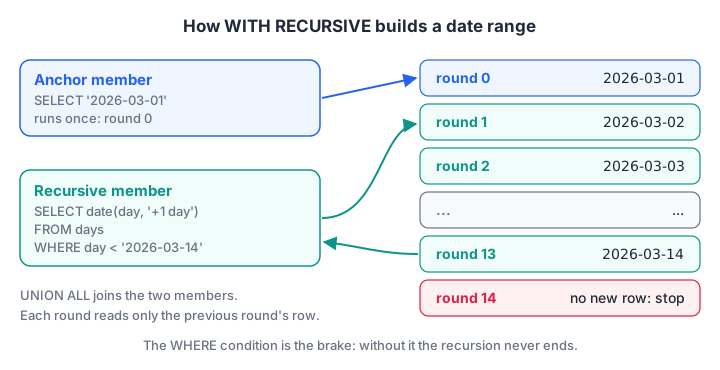
The anchor starts the sequence. Each round adds one row from the last round, and the WHERE condition is what stops the loop.
Generating a date range to find zero-sales days
An orders table only has rows for days when something sold. To find days with no sales, you first need a list of every date. A recursive CTE generates it, and a LEFT JOIN, as in SQL joins, does the rest.
import sqlite3

con = sqlite3.connect(":memory:")
con.executescript("""
CREATE TABLE orders (order_id INT, customer_id INT, store_id INT, order_date TEXT, amount INT, payment_mode TEXT);
INSERT INTO orders VALUES
 (101,1,1,'2026-03-01',1040,'UPI'), (102,2,2,'2026-03-01',330,'Cash'), (103,1,1,'2026-03-03',275,'UPI'),
 (104,3,3,'2026-03-04',180,'Card'), (105,4,2,'2026-03-05',680,'UPI'), (106,2,4,'2026-03-07',120,'Cash'),
 (107,5,3,'2026-03-08',1560,'Card'), (108,6,1,'2026-03-08',220,'UPI'), (109,4,4,'2026-03-10',340,NULL),
 (110,1,2,'2026-03-12',465,'Cash'), (111,6,3,'2026-03-14',NULL,'UPI');
""")

query = """
WITH RECURSIVE days(day) AS (
    SELECT '2026-03-01'                                         -- anchor member
    UNION ALL
    SELECT date(day, '+1 day') FROM days WHERE day < '2026-03-14'  -- recursive member
)
SELECT d.day, COUNT(o.order_id) AS orders, COALESCE(SUM(o.amount), 0) AS revenue
FROM days AS d
LEFT JOIN orders AS o ON o.order_date = d.day
GROUP BY d.day
"""
rows = con.execute(query).fetchall()
print(len(rows), "days generated")
print("Zero-order days:", [day for day, n, _ in rows if n == 0])
The CTE produces 14 dates, and five of them, 2, 6, 9, 11 and 13 March, had no orders at all. In MySQL the step is day + INTERVAL 1 DAY; in PostgreSQL, generate_series() can replace the recursive CTE entirely.
Walking a hierarchy
The self join article linked each Malwa Mart employee to their direct manager, one level at a time. A recursive CTE walks the whole chain. The anchor selects Rajesh, who has no manager. The recursive member adds everyone whose manager was found in the previous round, one level deeper each time.
WITH RECURSIVE chain AS (
    SELECT staff_id, name, 0 AS level FROM staff WHERE manager_id IS NULL
    UNION ALL
    SELECT s.staff_id, s.name, c.level + 1
    FROM staff AS s JOIN chain AS c ON s.manager_id = c.staff_id
)
SELECT name, level FROM chain ORDER BY level, name;
The result places Rajesh at level 0, the two store managers at level 1, and the three branch staff at level 2.
Quick check
What stops a recursive CTE from running forever?
Recursion ends when a round returns no rows, which happens when the recursive member's WHERE condition stops matching.
Common mistakes with SQL CTEs
- No stop condition in a recursive CTE. Without
WHERE day < ..., the query loops forever in SQLite. MySQL stops at itscte_max_recursion_depthlimit (1,000 by default) with an error. - Writing WITH twice. Use commas between CTEs.
- Using a CTE after its statement ends. A CTE is not saved. Use a view or a table for that.
- Forgetting RECURSIVE. PostgreSQL and MySQL need
WITH RECURSIVEfor a self-referencing CTE. SQLite accepts it with or without the word, and SQL Server does not use it. - Using UNION instead of UNION ALL in recursion. UNION adds a duplicate check every round, which is slower and rarely needed.
- Running on MySQL 5.7. CTEs arrived in MySQL 8.0, so older servers report a syntax error.
CTEs are how working analysts keep long report queries maintainable, and the next article on SQL window functions uses them constantly.
If you prefer to learn this with a mentor and real project data, Debugshala's data analytics batches in Indore start with a free demo class. To keep your logic sharp, run through logic puzzles and coding MCQs on Debugshala Test.
Key takeaways
- A CTE is a named temporary result defined with WITH and used by one statement.
- Multiple CTEs are separated by commas, and later ones can use earlier ones.
- CTEs make multi-step logic readable and easy to debug one step at a time.
- A recursive CTE has an anchor member, UNION ALL and a recursive member with a stop condition.
- Recursive CTEs generate date ranges and walk hierarchies.
- MySQL needs version 8.0+; PostgreSQL 12+ inlines simple CTEs for speed.
FAQ
What is a CTE in SQL with an example?
A CTE is a named temporary result defined with WITH before the main query. For example, WITH store_totals AS (SELECT store_id, SUM(amount) AS revenue FROM orders GROUP BY store_id) SELECT * FROM store_totals WHERE revenue > 1000 first totals each store, then filters those totals by name.
What is the difference between a CTE and a subquery?
Both create a temporary result inside one query. A CTE is defined once at the top with a name and can be referenced several times, and it can be recursive. A subquery is written inline where it is used and must be repeated if needed twice. Performance is usually the same in modern databases.
Are CTEs faster than subqueries?
Usually they perform the same, because PostgreSQL 12+, SQL Server and SQLite generally inline a CTE like a subquery. In PostgreSQL 11 and earlier, CTEs were always materialised, which could be slower or faster depending on the query. Choose CTEs for readability and check EXPLAIN output when speed matters.
Does MySQL support WITH clause CTEs?
Yes, from MySQL 8.0 onwards, including recursive CTEs with WITH RECURSIVE. MySQL 5.7 and older do not support them, so on those servers you rewrite CTEs as derived tables in FROM. MariaDB has supported CTEs since version 10.2.
Where can I learn advanced SQL like CTEs in Indore?
Debugshala, an IT training and placement institute at Old Palasia, Indore, teaches SQL from basics to CTEs and window functions within its Data Analytics course. Classes are offline in English and Hindi, freshers and non-IT graduates are welcome, placement assistance is offered, and you can attend a free demo class first.
From the team behind this site
Go further with the Data Analytics Course at Debugshala
These tutorials are written by Debugshala, a training and placement institute at Old Palasia, Indore. The classroom course adds live mentoring, real projects and interview preparation.
- Offline classes at Old Palasia, Indore
- Free demo class before you pay
- Non-IT, fresher and year-gap friendly
- Placement assistance
700+ students placed · 200+ hiring partners · 4.9★ Google rating
