

SQL GROUP BY and HAVING: Group, Summarise and Filter Totals
Learn SQL GROUP BY and HAVING with runnable examples: totals per store, multi-column groups, WHERE vs HAVING, and the ungrouped column trap.
On the first Sunday of April, Malwa Mart's owner tips all of March's bills onto a table at the head office. He does not want one grand total this time. He wants to know how each of the four branches did.
So he sorts the bills into four piles: Vijay Nagar, Palasia, Rajwada and Bhawarkuan. Then he adds up each pile and writes one line per branch on a sheet. Finally he crosses out every branch that sold less than 1,500 rupees, because those are the ones he will visit next week.
Sorting the bills into piles is GROUP BY. Adding up each pile is an aggregate function such as SUM. Crossing out the weak piles is HAVING. The bills themselves are the rows of the orders table.
SQL GROUP BY groups rows that have the same value in one or more columns, so that aggregate functions return one summary row per group, and HAVING filters those summary rows by a condition.
In the previous article on SQL aggregate functions every query returned a single row for the whole table. GROUP BY is what turns that one number into a small report. The examples run on SQLite through Python's built-in sqlite3 module, and the text points out where MySQL 8 and PostgreSQL 16 behave differently.
What does GROUP BY do in SQL?
Think of GROUP BY as three steps the database performs for you.
- Split. It reads every row that survived
WHEREand puts rows with the samestore_idinto the same bucket. - Apply. It runs each aggregate (
COUNT,SUM,AVG,MIN,MAX) separately inside each bucket. - Combine. It returns one row per bucket, with the grouping value and the aggregate results side by side.
Malwa Mart's March orders table has eleven rows spread across four stores, so grouping by store_id gives exactly four result rows.
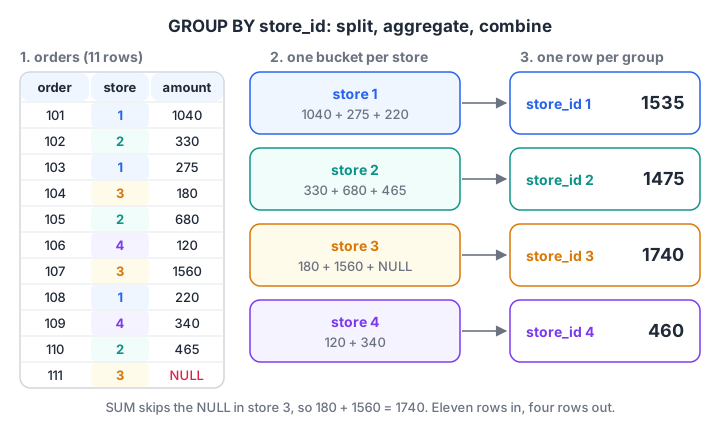
GROUP BY store_id puts each order in its store's bucket, SUM runs inside each bucket, and four rows come out.
SELECT store_id,
       COUNT(*)    AS orders,
       SUM(amount) AS revenue
FROM orders
GROUP BY store_id
ORDER BY revenue DESC;
Here is the same query on the real data. The block builds the orders table used throughout this series, including order 111, whose amount is still NULL.
import sqlite3

con = sqlite3.connect(":memory:")
con.executescript("""
CREATE TABLE orders (order_id INT, customer_id INT, store_id INT, order_date TEXT, amount INT, payment_mode TEXT);
INSERT INTO orders VALUES
 (101,1,1,'2026-03-01',1040,'UPI'), (102,2,2,'2026-03-01',330,'Cash'), (103,1,1,'2026-03-03',275,'UPI'),
 (104,3,3,'2026-03-04',180,'Card'), (105,4,2,'2026-03-05',680,'UPI'), (106,2,4,'2026-03-07',120,'Cash'),
 (107,5,3,'2026-03-08',1560,'Card'), (108,6,1,'2026-03-08',220,'UPI'), (109,4,4,'2026-03-10',340,NULL),
 (110,1,2,'2026-03-12',465,'Cash'), (111,6,3,'2026-03-14',NULL,'UPI');
""")

query = """
SELECT store_id, COUNT(*) AS orders, COUNT(amount) AS billed, SUM(amount) AS revenue
FROM orders
GROUP BY store_id
ORDER BY revenue DESC
"""
print("store | orders | billed | revenue")
for row in con.execute(query):
    print(row)
Rajwada (store 3) leads with 1,740 rupees. Its orders count is 3 but billed is 2, because order 111 has no amount yet.
Grouping by more than one column
You can list several columns after GROUP BY. The database then makes one group for every combination of values that actually appears in the data.
"How much did each store take through each payment mode?" needs two columns. Combinations that never happened, such as card payments at Vijay Nagar, simply do not appear. The cross join article shows how to fill those gaps with zeros.
import sqlite3

con = sqlite3.connect(":memory:")
con.executescript("""
CREATE TABLE orders (order_id INT, customer_id INT, store_id INT, order_date TEXT, amount INT, payment_mode TEXT);
INSERT INTO orders VALUES
 (101,1,1,'2026-03-01',1040,'UPI'), (102,2,2,'2026-03-01',330,'Cash'), (103,1,1,'2026-03-03',275,'UPI'),
 (104,3,3,'2026-03-04',180,'Card'), (105,4,2,'2026-03-05',680,'UPI'), (106,2,4,'2026-03-07',120,'Cash'),
 (107,5,3,'2026-03-08',1560,'Card'), (108,6,1,'2026-03-08',220,'UPI'), (109,4,4,'2026-03-10',340,NULL),
 (110,1,2,'2026-03-12',465,'Cash'), (111,6,3,'2026-03-14',NULL,'UPI');
""")

query = """
SELECT store_id, payment_mode, COUNT(*) AS orders, SUM(amount) AS revenue
FROM orders
GROUP BY store_id, payment_mode
ORDER BY store_id, revenue DESC
"""
for row in con.execute(query):
    print(row)
Eleven orders become seven groups. Notice the row (4, None, 1, 340): order 109 has no payment mode, and GROUP BY puts all NULLs into one group of their own. That is different from WHERE payment_mode = NULL, which matches nothing. MySQL and PostgreSQL treat NULL groups the same way.
Grouping by an expression
You are not limited to plain columns. You can group by any expression, such as the week of the order or a price band. In SQLite, strftime('%W', order_date) gives the week number of the year. MySQL uses WEEK(order_date) and PostgreSQL uses EXTRACT(WEEK FROM order_date).
SELECT strftime('%W', order_date) AS week, SUM(amount) AS revenue
FROM orders
GROUP BY week;
Grouping by an alias such as week works in SQLite, MySQL and PostgreSQL, but not in SQL Server. For banding values into groups like "small", "medium" and "large", combine GROUP BY with SQL CASE WHEN.
What is the HAVING clause?
HAVING is a filter that runs after the groups have been summarised. It can test aggregate results, which WHERE cannot.
The owner's rule, "show only stores with revenue above 1,500", is a condition on SUM(amount). That sum does not exist until the groups are built, so it must go in HAVING.
SELECT store_id, SUM(amount) AS revenue
FROM orders
GROUP BY store_id
HAVING SUM(amount) > 1500;
WHERE vs HAVING: which filter when?
| WHERE | HAVING | |
|---|---|---|
| Filters | Individual rows | Groups after aggregation |
| Runs | Before GROUP BY | After GROUP BY |
| Can use aggregates like SUM()? | No | Yes |
| Typical use | payment_mode = 'UPI' |
COUNT(*) >= 2 |
| Works without GROUP BY? | Yes | Yes, the whole table is treated as one group |
The database processes a query in a fixed logical order, not the order you type it.
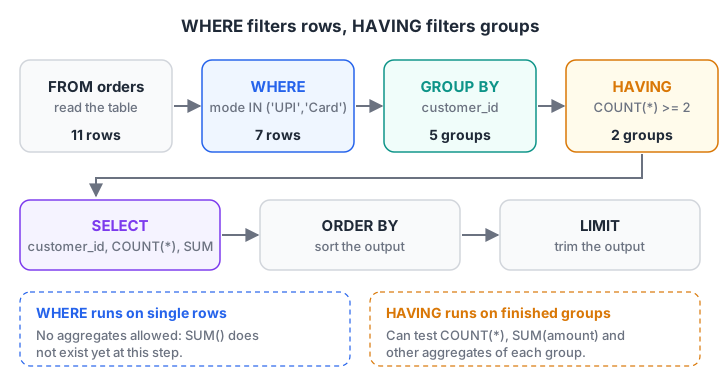
WHERE removes rows before the piles are made. HAVING removes whole piles after they are summed.
The next block uses both filters in one query. WHERE keeps only digital payments (UPI and Card). GROUP BY makes one group per customer. HAVING keeps only customers with at least two digital orders.
import sqlite3

con = sqlite3.connect(":memory:")
con.executescript("""
CREATE TABLE orders (order_id INT, customer_id INT, store_id INT, order_date TEXT, amount INT, payment_mode TEXT);
INSERT INTO orders VALUES
 (101,1,1,'2026-03-01',1040,'UPI'), (102,2,2,'2026-03-01',330,'Cash'), (103,1,1,'2026-03-03',275,'UPI'),
 (104,3,3,'2026-03-04',180,'Card'), (105,4,2,'2026-03-05',680,'UPI'), (106,2,4,'2026-03-07',120,'Cash'),
 (107,5,3,'2026-03-08',1560,'Card'), (108,6,1,'2026-03-08',220,'UPI'), (109,4,4,'2026-03-10',340,NULL),
 (110,1,2,'2026-03-12',465,'Cash'), (111,6,3,'2026-03-14',NULL,'UPI');
""")

def show(title, sql):
    print(title, con.execute(sql).fetchall())

show("Stores above 1,500:", "SELECT store_id, SUM(amount) FROM orders GROUP BY store_id HAVING SUM(amount) > 1500")
show("Repeat digital customers:", """
    SELECT customer_id, COUNT(*) AS digital_orders, SUM(amount) AS spent
    FROM orders
    WHERE payment_mode IN ('UPI', 'Card')
    GROUP BY customer_id
    HAVING COUNT(*) >= 2""")
Only Rajwada (1,740) and Vijay Nagar (1,535) clear the 1,500 bar. Two customers paid digitally twice: customer 1 spent 1,315 rupees and customer 6 spent 220, because order 111 still has no amount.
Quick check
You want stores whose total revenue is above 1,500. Where does the condition SUM(amount) > 1500 go?
The sum exists only after rows are grouped, so the condition belongs in HAVING. WHERE runs before grouping and cannot use aggregates.
Why every SELECT column must be grouped or aggregated
Look at this query:
SELECT store_id, payment_mode, SUM(amount)
FROM orders
GROUP BY store_id;
Each store has several payment modes, so which one should appear beside the store's total? There is no single correct answer.
PostgreSQL rejects the query with "column must appear in the GROUP BY clause or be used in an aggregate function". MySQL 8 rejects it too while its default ONLY_FULL_GROUP_BY mode is on. SQLite runs it and quietly shows a payment mode from one arbitrary row of each group, which looks like a real answer but is not.
The rule that keeps you safe everywhere: every column in SELECT is either listed in GROUP BY or wrapped in an aggregate. PostgreSQL relaxes this only when you group by a primary key, because the other columns of that row are then fixed.
Showing store names instead of ids
A report that says "store 3" is less useful than one that says "Malwa Mart Rajwada". The names live in the stores table, so you need a join first and then GROUP BY store_name. That is exactly where the next article, SQL joins, begins.
Quick check
A table has orders from 4 stores and 3 payment modes, but only 7 store-and-mode combinations actually occur. How many rows does GROUP BY store_id, payment_mode return?
GROUP BY creates one group for each combination present in the data, not every possible combination.
Quick check
Which query runs on PostgreSQL without an error?
Every selected column must be grouped or aggregated, and aggregates cannot appear in WHERE.
Common mistakes with GROUP BY and HAVING
- Putting an aggregate in WHERE.
WHERE SUM(amount) > 1500is an error. Move it to HAVING. - Using HAVING for row filters.
HAVING payment_mode = 'UPI'only works ifpayment_modeis grouped, and it is slower. Use WHERE. - Trusting SQLite's bare columns. SQLite accepts ungrouped columns and picks a value at random. Test such queries on PostgreSQL or MySQL before you trust them.
- Counting the wrong thing.
COUNT(*)counts rows in each group,COUNT(amount)counts non-NULL amounts. Rajwada shows 3 versus 2. - Grouping after a join that repeats rows. If a join duplicates orders, every SUM in the group is inflated. Check the row count before grouping.
If you think in pandas, df.groupby("store_id")["amount"].sum() is the same split-apply-combine idea, explained in pandas GroupBy and pivot tables. For mentoring on turning these queries into weekly business reports, Debugshala's SQL reporting sessions in Indore begin with a free demo class. Between lessons, test your query logic on Debugshala Test.
Key takeaways
- GROUP BY splits rows into groups by one or more columns, and each aggregate returns one value per group.
- Multi-column GROUP BY makes one group per combination that exists in the data.
- NULL values form their own single group.
- WHERE filters rows before grouping; HAVING filters groups after aggregation.
- The logical order is FROM, WHERE, GROUP BY, HAVING, SELECT, ORDER BY, LIMIT.
- Keep every selected column grouped or aggregated, even though SQLite does not force you to.
FAQ
What is the difference between WHERE and HAVING in SQL?
WHERE filters individual rows before they are grouped, so it cannot use aggregate functions. HAVING filters groups after GROUP BY has summarised them, so it can test results such as SUM(amount) or COUNT(*). Use WHERE for conditions on raw columns and HAVING for conditions on totals.
Can I use HAVING without GROUP BY?
Yes. Without GROUP BY, the whole result is treated as one group, so HAVING decides whether that single summary row is returned at all. For example, SELECT SUM(amount) FROM orders HAVING SUM(amount) > 5000 returns the total only when it exceeds 5,000. In practice HAVING is almost always paired with GROUP BY.
Does GROUP BY sort the results?
Not reliably. Some databases happen to return grouped rows in sorted order because of how they build groups, but the SQL standard does not promise it, and the order can change with an index or a new version. Always add ORDER BY when the order of the report matters.
How do I count rows per group in SQL?
Use COUNT() with GROUP BY, as in SELECT store_id, COUNT() FROM orders GROUP BY store_id. That returns one row per store with its number of orders. Use COUNT(column) instead if you want to skip rows where that column is NULL, and COUNT(DISTINCT column) to count unique values per group.
Where can I practise SQL GROUP BY with a trainer in Indore?
Debugshala, a training and placement institute at Old Palasia, Indore, teaches SQL as part of its Data Analytics course, with offline classes in English and Hindi. Fresh graduates, non-IT learners and people with a year gap can join, placement assistance is offered, and a free demo class comes first.
From the team behind this site
Go further with the Data Analytics Course at Debugshala
These tutorials are written by Debugshala, a training and placement institute at Old Palasia, Indore. The classroom course adds live mentoring, real projects and interview preparation.
- Offline classes at Old Palasia, Indore
- Free demo class before you pay
- Non-IT, fresher and year-gap friendly
- Placement assistance
700+ students placed · 200+ hiring partners · 4.9★ Google rating
