

SQL INSERT, UPDATE and DELETE: Add and Change Data Safely
SQL INSERT, UPDATE and DELETE explained with runnable examples, a safe transaction routine, upserts, and the missing WHERE mistake to avoid.
Every Monday morning, the manager at Malwa Mart's Palasia branch updates the price board by the entrance. A new namkeen brand arrives, so she writes a fresh line. Toor dal went up by 10 rupees, so she rubs out one number and writes another. A detergent was discontinued, so she wipes its line off completely.
She is careful about one thing. When she rubs out a price, she rubs out only the dal price, not every price on the board.
Those three actions map exactly to SQL. Writing a new line is INSERT. Changing a number is UPDATE. Wiping a line is DELETE. And "only the dal price" is the WHERE clause that keeps a change from touching rows it should not.
INSERT, UPDATE and DELETE are the SQL data manipulation (DML) commands that add new rows, modify existing rows and remove rows from a table.
In the last article you built the Malwa Mart tables with CREATE TABLE and ALTER TABLE. Those tables are empty shelves. This article fills them and keeps them up to date.
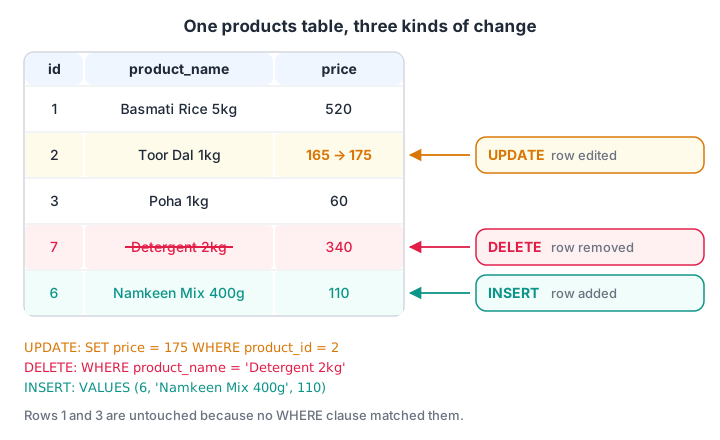
The same products table before and after each command. INSERT adds a row, UPDATE edits a value in place and DELETE removes a row.
How does SQL INSERT work?
INSERT INTO names the table, optionally lists the columns, and gives the values in the same order.
-- One row, with an explicit column list (recommended)
INSERT INTO products (product_id, product_name, category, price)
VALUES (6, 'Namkeen Mix 400g', 'Snacks', 110);

-- Several rows in one statement
INSERT INTO products (product_id, product_name, category, price)
VALUES (7, 'Detergent 2kg', 'Household', 340),
       (8, 'Sev 500g',      'Snacks',    120);
Always write the column list. If someone later adds a column with ALTER TABLE, an insert without the list breaks or, worse, puts values in the wrong columns. Columns you leave out receive their DEFAULT, or NULL if there is none.
import sqlite3

con = sqlite3.connect(":memory:")
con.execute("""CREATE TABLE products (product_id INTEGER PRIMARY KEY, product_name TEXT NOT NULL,
               category TEXT, price INTEGER, in_stock INTEGER DEFAULT 1)""")

con.execute("INSERT INTO products (product_id, product_name, category, price) VALUES (1, 'Poha 1kg', 'Grocery', 60)")
con.execute("""INSERT INTO products (product_id, product_name, category, price)
               VALUES (2, 'Toor Dal 1kg', 'Grocery', 165), (3, 'Sev 500g', 'Snacks', 120)""")
con.execute("INSERT INTO products (product_name, category) VALUES ('Paneer 200g', 'Dairy')")

for row in con.execute("SELECT * FROM products"):
    print(row)
Paneer got product_id 4 automatically, because an INTEGER PRIMARY KEY picks the next number in SQLite. Its price is None (NULL) because no price was given, and in_stock is 1 from the default.
INSERT ... SELECT: copy rows from a query
You can insert the result of a query instead of typed values. This is how analysts build summary or archive tables.
INSERT INTO archived_orders (order_id, customer_id, amount)
SELECT order_id, customer_id, amount
FROM orders
WHERE order_date < '2026-01-01';
Inserting from Python safely with placeholders
When values come from a form, a CSV or a variable, never paste them into the SQL string with an f-string. A single apostrophe can break the query, and a crafted value can change what the query does. That attack is called SQL injection.
Pass the values separately with ? placeholders. The sqlite3 driver sends them as data, never as SQL, so they cannot break the statement. MySQL and PostgreSQL drivers do the same with %s.
import sqlite3

con = sqlite3.connect(":memory:")
con.execute("CREATE TABLE customers (customer_id INTEGER PRIMARY KEY, name TEXT, city TEXT)")
new_customer = ("Neha D'Souza", "Indore")

try:
    con.execute(f"INSERT INTO customers (name, city) VALUES ('{new_customer[0]}', '{new_customer[1]}')")
except sqlite3.OperationalError as err:
    print("f-string version failed:", err)

con.execute("INSERT INTO customers (name, city) VALUES (?, ?)", new_customer)
con.executemany("INSERT INTO customers (name, city) VALUES (?, ?)",
                [("Ravi Patel", "Indore"), ("Meera Joshi", "Dewas")])
print(con.execute("SELECT * FROM customers").fetchall())
The apostrophe in D'Souza closed the quoted string early, so the f-string version crashed. The placeholder version stored the name perfectly. executemany() runs one statement for a whole list of rows, which is how you load a file quickly.
How does SQL UPDATE work?
UPDATE sets new values in rows that match a condition.
-- One product: dal goes up by 10 rupees
UPDATE products SET price = price + 10 WHERE product_id = 2;

-- Many products: all Grocery prices up by 5 percent, rounded
UPDATE products SET price = ROUND(price * 1.05) WHERE category = 'Grocery';
SET can use the column's current value, as in price + 10, and it can change several columns at once: SET price = 99, in_stock = 0. The WHERE clause decides which rows change. It uses the same conditions you will learn in SQL SELECT and WHERE.
import sqlite3

con = sqlite3.connect(":memory:")
con.execute("CREATE TABLE products (product_id INTEGER PRIMARY KEY, product_name TEXT, category TEXT, price INTEGER)")
con.executemany("INSERT INTO products VALUES (?, ?, ?, ?)", [
    (1, "Basmati Rice 5kg", "Grocery", 520), (2, "Toor Dal 1kg", "Grocery", 165),
    (3, "Poha 1kg", "Grocery", 60), (4, "Sev 500g", "Snacks", 120)])

cur = con.execute("UPDATE products SET price = price + 10 WHERE product_id = 2")
print("Dal update changed", cur.rowcount, "row")

cur = con.execute("UPDATE products SET price = CAST(ROUND(price * 1.05) AS INTEGER) WHERE category = 'Grocery'")
print("Grocery update changed", cur.rowcount, "rows")

for row in con.execute("SELECT product_name, price FROM products"):
    print(row)
In SQLite, ROUND() returns a decimal value, so the runnable version wraps it in CAST(... AS INTEGER) to keep whole rupees. cursor.rowcount tells you how many rows the statement touched. Check it every time. If you expected 1 and see 4, something is wrong with your WHERE.
Quick check
What does UPDATE products SET price = 0; do?
Without WHERE, UPDATE applies to all rows. The database does not warn you, which is why you preview and use transactions.
How does SQL DELETE work?
DELETE FROM removes the rows that match the condition. It removes whole rows; to blank out one value, use UPDATE ... SET col = NULL instead.
DELETE FROM products WHERE product_name = 'Detergent 2kg';The missing WHERE disaster
DELETE FROM products; with no WHERE removes every row. UPDATE products SET price = 0; sets every price to zero. The database will not ask "are you sure?". The block below makes that mistake on purpose, then saves the day with ROLLBACK.
import sqlite3

con = sqlite3.connect(":memory:")
con.execute("CREATE TABLE products (product_id INTEGER PRIMARY KEY, product_name TEXT, price INTEGER)")
con.executemany("INSERT INTO products VALUES (?, ?, ?)",
                [(1, "Poha 1kg", 60), (2, "Sev 500g", 120), (3, "Detergent 2kg", 340)])
con.commit()   # save the starting data

cur = con.execute("DELETE FROM products")          # oops: no WHERE
print("Rows deleted:", cur.rowcount)
print("Rows left:", con.execute("SELECT COUNT(*) FROM products").fetchone()[0])

con.rollback()                                      # undo everything since the last commit
print("After rollback:", con.execute("SELECT COUNT(*) FROM products").fetchone()[0])

with con:                                           # the correct delete, committed
    con.execute("DELETE FROM products WHERE product_name = ?", ("Detergent 2kg",))
print(con.execute("SELECT * FROM products").fetchall())
Python's sqlite3 module opens a transaction automatically before each change, so rollback() could undo the delete. In a SQL client such as MySQL Workbench, autocommit is often on, and the same mistake is permanent unless you typed BEGIN first.
A safe workflow for changing data
Professionals follow the same routine for any change to real data. It takes an extra minute and saves careers.
- Preview the rows. Run
SELECT * FROM products WHERE category = 'Grocery'with the exactWHEREyou plan to use. - Start a transaction. Run
BEGIN(orSTART TRANSACTIONin MySQL) so nothing is final yet. - Run the change. Execute your
UPDATEorDELETEwith the sameWHERE. - Check the count. Compare the affected-row count to what the preview showed.
- Commit or roll back.
COMMITif the numbers match;ROLLBACKif they do not.
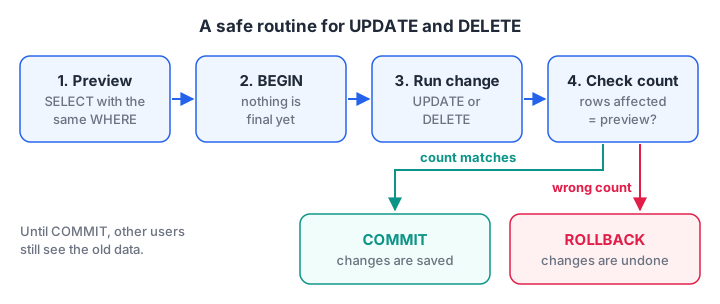
If the affected-row count does not match the preview, roll back. Nothing is saved until COMMIT.
Transactions have rules of their own, covered in SQL transactions and ACID.
DELETE vs TRUNCATE vs DROP
| Command | What it removes | Can use WHERE? | Table still exists? | Notes |
|---|---|---|---|---|
DELETE FROM t WHERE ... |
Matching rows | Yes | Yes | Logged row by row; can roll back |
TRUNCATE TABLE t |
All rows, fast | No | Yes | MySQL and PostgreSQL; not in SQLite |
DROP TABLE t |
The table and all its rows | No | No | Removes the structure too |
SQLite has no TRUNCATE. A DELETE FROM t without WHERE does the same job, and SQLite optimises it internally.
Quick check
Which command removes a table's structure as well as its rows?
DELETE and TRUNCATE empty the table but keep it. DROP removes the table itself.
Upsert: insert or update in one statement
Malwa Mart receives a daily price file from its supplier. Some products are new and some already exist. An upsert inserts new rows and updates existing ones in a single statement. SQLite (3.24+) and PostgreSQL share the syntax.
import sqlite3

con = sqlite3.connect(":memory:")
con.execute("CREATE TABLE products (product_id INTEGER PRIMARY KEY, product_name TEXT, price INTEGER)")
con.executemany("INSERT INTO products VALUES (?, ?, ?)", [(1, "Poha 1kg", 60), (2, "Sev 500g", 120)])

price_file = [(2, "Sev 500g", 125), (9, "Bhujia 400g", 95)]   # one changed price, one new product
con.executemany("""
    INSERT INTO products (product_id, product_name, price) VALUES (?, ?, ?)
    ON CONFLICT (product_id) DO UPDATE SET price = excluded.price
""", price_file)

for row in con.execute("SELECT * FROM products ORDER BY product_id"):
    print(row)
excluded refers to the row you tried to insert. MySQL 8 writes the same idea as INSERT ... ON DUPLICATE KEY UPDATE price = VALUES(price), or with a row alias in newer versions.
Common mistakes with INSERT, UPDATE and DELETE
- No WHERE on UPDATE or DELETE. Every row changes. Always preview first.
- Inserting without a column list. It breaks the day the table gains a column.
- Building SQL with f-strings. Apostrophes crash it and injection becomes possible. Use placeholders.
- Forgetting to commit. In Python, changes outside
with con:orcon.commit()vanish when the connection closes. - Deleting parents before children. With foreign keys on, you cannot delete a customer who still has orders. Delete or reassign the orders first.
For more practice beyond this page, warm up with quick quizzes on Debugshala Test, or join a mentor-led analytics course in Indore that starts with a free demo class.
Key takeaways
INSERT INTO t (cols) VALUES (...)adds rows; always list the columns.UPDATE t SET col = value WHERE ...changes matching rows;DELETE FROM t WHERE ...removes them.- A missing
WHEREchanges or deletes every row. - Preview, wrap in a transaction, check
rowcount, then commit or roll back. - Use
?placeholders in Python. Next, learn to read the data back with SELECT and WHERE.
FAQ
How do I insert multiple rows in SQL at once?
List several value groups after VALUES, separated by commas: INSERT INTO products (product_id, product_name) VALUES (7, 'Sev'), (8, 'Poha'). MySQL, PostgreSQL and SQLite all support this. From Python, use executemany() with a list of tuples, which is faster than one call per row.
Can I undo a DELETE in SQL?
Only if the delete ran inside a transaction that has not been committed yet; then ROLLBACK restores the rows. After COMMIT, or in a tool with autocommit on, the rows are gone and you need a backup. That is why careful analysts type BEGIN before any delete.
What is the difference between DELETE and TRUNCATE?
DELETE removes the rows that match a WHERE condition and can be rolled back inside a transaction. TRUNCATE empties the whole table at once, is much faster on large tables and cannot take a condition. SQLite has no TRUNCATE; a DELETE without WHERE does the same.
Why does UPDATE say 0 rows affected?
The WHERE clause matched no rows. Common causes are a typo in a text value, different capitalisation, extra spaces, or comparing a number stored as text. Run the same WHERE in a SELECT to see what it matches, then fix the condition.
Do data analysts use INSERT, UPDATE and DELETE?
Less often than SELECT, but yes. Analysts insert data into staging tables, update labels while cleaning data and delete test rows. Many companies give analysts read-only access to production, so these commands are used mostly in personal or staging databases.
Is there an SQL course in Indore for beginners?
Yes. Debugshala's Data Analytics course runs offline at Old Palasia, Indore, in English and Hindi. It accepts fresh graduates, non-IT students and people with a year gap, and offers placement assistance. You can attend a free demo class before paying anything.
From the team behind this site
Go further with the Data Analytics Course at Debugshala
These tutorials are written by Debugshala, a training and placement institute at Old Palasia, Indore. The classroom course adds live mentoring, real projects and interview preparation.
- Offline classes at Old Palasia, Indore
- Free demo class before you pay
- Non-IT, fresher and year-gap friendly
- Placement assistance
700+ students placed · 200+ hiring partners · 4.9★ Google rating
