

SQL String Functions: TRIM, SUBSTR, REPLACE, CONCAT and More
SQL string functions with runnable examples: clean names and phone numbers with TRIM, REPLACE and SUBSTR, join text, and SQLite vs MySQL names.
Malwa Mart has just collected loyalty sign-ups on paper forms at its Palasia store, and an intern typed them into a spreadsheet. One name came in as " asha verma ", another as "RAVI PATEL". One phone number has a +91 and spaces, another a dash, another a leading zero, and one form had no number at all.
None of this is wrong in a way a person would notice. You can read every entry. But a computer comparing " asha verma " with "Asha Verma" sees two different customers, and an SMS gateway will reject "+91 98260 11234" if it expects ten plain digits.
Fixing this by hand works for seven rows. For seven thousand rows from every store, you want the database to do it. The spaces, the capital letters and the stray symbols are all text problems, and SQL's string functions are the tools for them.
SQL string functions are built-in functions that take text values and return a changed version, such as trimmed, upper-cased, cut out or joined text, for each row a query reads.
This article works through the loyalty import step by step, then looks at product names and formatted invoice numbers. It builds on SELECT and WHERE, where you met LIKE and ||, and on the NULL handling guide, since blank text and NULL often need converting.
The SQL string functions analysts use most
Every major database has the same core set, but the names and argument orders vary. This table is the one to bookmark.
| Task | SQLite | MySQL 8 | PostgreSQL |
|---|---|---|---|
| Upper / lower case | UPPER(s), LOWER(s) |
same | same |
| Remove edge spaces | TRIM(s), LTRIM, RTRIM |
same | same |
| Length in characters | LENGTH(s) |
CHAR_LENGTH(s) |
LENGTH(s) |
| Part of a string | SUBSTR(s, start, len) |
SUBSTRING(s, start, len) |
SUBSTRING(s FROM start FOR len) or SUBSTR |
| Position of a substring | INSTR(s, 'x') |
INSTR(s, 'x') or LOCATE('x', s) |
POSITION('x' IN s) or STRPOS(s, 'x') |
| Replace text | REPLACE(s, 'a', 'b') |
same | same |
| Join text | a || b, CONCAT() in 3.44+ |
CONCAT(a, b) |
a || b or CONCAT(a, b) |
| Pad on the left | printf('%06d', n) |
LPAD(s, 6, '0') |
LPAD(s, 6, '0') |
| Capitalise each word | not built in | not built in | INITCAP(s) |
Positions in SQL start at 1, not 0 as in Python. SUBSTR('Malwa', 1, 3) returns 'Mal'. If you know Python's string methods, keep this difference in mind.
Cleaning names with TRIM, UPPER and LOWER
TRIM removes spaces from both ends of a string. LOWER and UPPER change the case. Together they turn messy text into a matching key: a version of the value that two people typing the same name will both produce.
The block below compares the raw import with the clean customers table. An exact join finds only the two rows that were typed correctly. Cleaning both sides finds six, and the seventh reveals a double space inside "Meera Joshi".
import sqlite3

con = sqlite3.connect(":memory:")
con.executescript("""
CREATE TABLE customers (customer_id INT, name TEXT, city TEXT);
INSERT INTO customers VALUES (1,'Asha Verma','Indore'), (2,'Ravi Patel','Indore'), (3,'Meera Joshi','Dewas'),
 (4,'Pooja Rathore','Ujjain'), (5,'Sana Qureshi','Indore'), (6,'Vikram Chouhan','Indore'), (7,'Neha D''Souza','Indore');
CREATE TABLE customer_import (row_no INT, raw_name TEXT, raw_phone TEXT);
INSERT INTO customer_import VALUES (1,'  asha verma ','+91 98260 11234'), (2,'RAVI PATEL','98270-22345'),
 (3,'Meera  Joshi','09893033456'), (4,'pooja rathore ','+91-9425044567'), (5,'Sana Qureshi','9826055678'),
 (6,' Vikram Chouhan','98260 66789'), (7,'Neha D''Souza','  ');
""")

exact = "SELECT COUNT(*) FROM customer_import i JOIN customers c ON c.name = i.raw_name"
clean = "SELECT COUNT(*) FROM customer_import i JOIN customers c ON LOWER(c.name) = LOWER(TRIM(i.raw_name))"
fixed = """SELECT COUNT(*) FROM customer_import i JOIN customers c
           ON LOWER(c.name) = LOWER(REPLACE(TRIM(i.raw_name), '  ', ' '))"""
print("exact match         :", con.execute(exact).fetchone()[0])
print("TRIM + LOWER        :", con.execute(clean).fetchone()[0])
print("+ REPLACE '  ' -> ' ':", con.execute(fixed).fetchone()[0])

for row in con.execute("SELECT raw_name, LENGTH(raw_name), UPPER(TRIM(raw_name)) FROM customer_import LIMIT 3"):
    print(row)
LENGTH(' asha verma ') is 13, while the clean name has 10 characters. Printing lengths is a quick way to spot hidden spaces that you cannot see in the output.
TRIM only works on the ends. A double space in the middle needs REPLACE. For three or more spaces in a row, you would repeat the REPLACE or, in PostgreSQL, use regexp_replace(name, '\s+', ' ', 'g').
Cleaning phone numbers with REPLACE and SUBSTR
Phone numbers are the classic mixed-format column. The plan is a short pipeline of string functions, each fixing one problem.
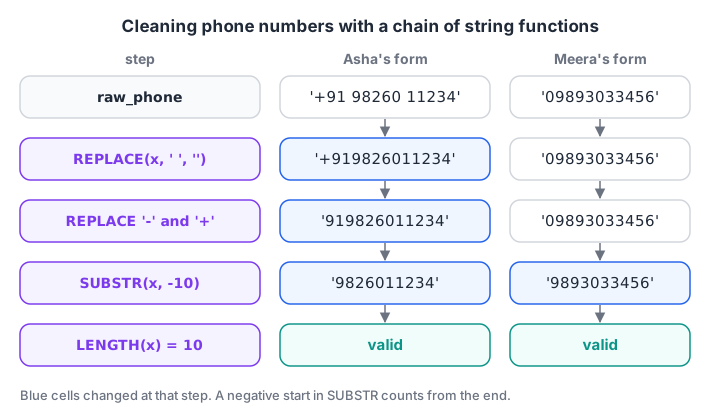
Each function fixes one formatting problem. SUBSTR with a negative start keeps the last ten characters, which drops both +91 and a leading 0.
TRIMremoves spaces at the ends.REPLACEremoves the inner spaces, then dashes, then the plus sign. Nested REPLACE calls run from the inside out.SUBSTR(x, -10)keeps the last ten characters. A negative start counts from the end in SQLite, MySQL and Oracle. PostgreSQL usesRIGHT(x, 10)instead.NULLIF(x, '')turns an empty result into a real NULL.LENGTH(x) = 10checks the result.
import sqlite3

con = sqlite3.connect(":memory:")
con.executescript("""
CREATE TABLE customer_import (row_no INT, raw_name TEXT, raw_phone TEXT);
INSERT INTO customer_import VALUES (1,'  asha verma ','+91 98260 11234'), (2,'RAVI PATEL','98270-22345'),
 (3,'Meera  Joshi','09893033456'), (4,'pooja rathore ','+91-9425044567'), (5,'Sana Qureshi','9826055678'),
 (6,' Vikram Chouhan','98260 66789'), (7,'Neha D''Souza','  ');
""")

query = """
WITH cleaned AS (
    SELECT row_no, raw_phone,
           NULLIF(SUBSTR(REPLACE(REPLACE(REPLACE(TRIM(raw_phone), ' ', ''), '-', ''), '+', ''), -10), '') AS phone
    FROM customer_import
)
SELECT row_no, raw_phone, phone,
       CASE WHEN LENGTH(phone) = 10 THEN 'valid' ELSE 'check form' END AS status
FROM cleaned
"""
for row in con.execute(query):
    print(row)
Six numbers come out as ten plain digits, and Neha's blank form shows NULL with "check form". The query used a CTE so the long expression is written once and then tested by name.
Extracting parts of text with SUBSTR, INSTR and LENGTH
INSTR(s, ' ') returns the position of the first space, or 0 if there is none. Combined with SUBSTR, it splits text at a known character.
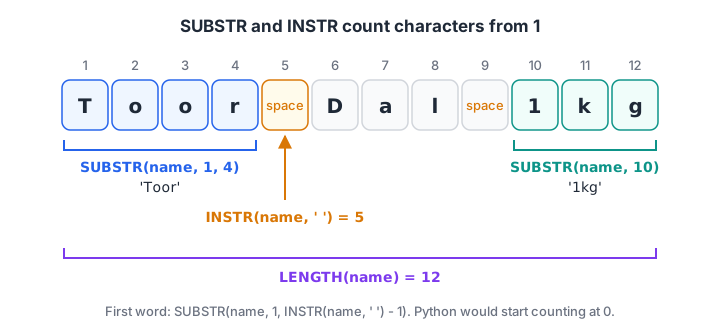
SQL counts characters from 1. INSTR finds the first space at 5, so the first word is SUBSTR(name, 1, 4).
Malwa Mart's product names end in a pack size, such as "Basmati Rice 5kg". The first word is easy. The last word is harder, because SQLite has no "find the last space" function.
import sqlite3

con = sqlite3.connect(":memory:")
con.execute("CREATE TABLE products (product_id INT, product_name TEXT, category TEXT, price INT)")
con.executemany("INSERT INTO products VALUES (?, ?, ?, ?)", [
    (1, "Basmati Rice 5kg", "Grocery", 520), (2, "Toor Dal 1kg", "Grocery", 165),
    (3, "Poha 1kg", "Grocery", 60), (4, "Butter 500g", "Dairy", 275),
    (5, "Paneer 200g", "Dairy", 90), (6, "Namkeen Mix 400g", "Snacks", 110),
    (7, "Detergent 2kg", "Household", 340), (8, "Sev 500g", "Snacks", 120)])

query = """
SELECT product_name,
       INSTR(product_name, ' ')                              AS first_space,
       SUBSTR(product_name, 1, INSTR(product_name, ' ') - 1) AS first_word,
       SUBSTR(product_name,
              LENGTH(RTRIM(product_name, REPLACE(product_name, ' ', ''))) + 1) AS pack_size
FROM products
WHERE product_id IN (1, 2, 6, 8)
"""
for row in con.execute(query):
    print(row)
The pack-size line is a known SQLite trick. RTRIM(s, chars) strips any of the listed characters from the right. Listing every non-space character of the name strips the last word and stops at the final space. The length of what remains tells SUBSTR where the last word starts.
Other databases make this a one-liner. MySQL has SUBSTRING_INDEX(product_name, ' ', -1), and PostgreSQL 14+ has SPLIT_PART(product_name, ' ', -1). If you need the logic often, storing pack size in its own column is the better design, a point the normalisation article returns to.
Quick check
What does SUBSTR('Toor Dal 1kg', 6, 3) return?
SQL positions start at 1. Character 6 is 'D', and a length of 3 gives 'Dal'.
Joining and formatting text
Concatenation glues values together. SQLite and PostgreSQL use ||. MySQL uses CONCAT(), because || means OR there by default. CONCAT_WS(sep, a, b, ...) adds a separator between pieces and skips NULLs, which makes it safer for labels with optional parts.
For codes with leading zeros, SQLite uses printf() (also called format() from 3.38). MySQL and PostgreSQL use LPAD.
import sqlite3

con = sqlite3.connect(":memory:")
con.executescript("""
CREATE TABLE orders (order_id INT, customer_id INT, store_id INT, order_date TEXT, amount INT, payment_mode TEXT);
INSERT INTO orders VALUES (101,1,1,'2026-03-01',1040,'UPI'), (109,4,4,'2026-03-10',340,NULL),
 (110,1,2,'2026-03-12',465,'Cash');
""")
print("SQLite", sqlite3.sqlite_version)
for row in con.execute("SELECT printf('MM-%06d', order_id), 'Store ' || store_id || ' / ' || payment_mode FROM orders"):
    print(row)

try:
    sql = "SELECT CONCAT_WS(' / ', 'Store ' || store_id, payment_mode) FROM orders"
    print([r[0] for r in con.execute(sql)])
except sqlite3.OperationalError as err:
    print("CONCAT_WS needs SQLite 3.44+:", err)

print("characters:", con.execute("SELECT LENGTH('इंदौर')").fetchone()[0],
      "| bytes:", con.execute("SELECT LENGTH(CAST('इंदौर' AS BLOB))").fetchone()[0])
Order 109's label with || is None, because joining NULL gives NULL. CONCAT_WS skips the missing payment mode and still prints "Store 4".
The last line matters for Indian data. "इंदौर" has 5 characters but takes 15 bytes in UTF-8. SQLite's LENGTH counts characters for text. MySQL's LENGTH counts bytes, so use CHAR_LENGTH there when names are in Hindi.
Pattern matching beyond LIKE
LIKE handles simple patterns with % and _. For real patterns, MySQL has REGEXP_LIKE() and PostgreSQL has the ~ operator. SQLite understands the REGEXP keyword but ships no function behind it. From Python you can supply one with con.create_function("regexp", 2, ...), a handy trick covered in the official sqlite3 documentation.
Quick check
In SQLite, what is the result of 'Store 4' || ' / ' || NULL?
Concatenating with NULL gives NULL. Use COALESCE on the optional part, or CONCAT_WS, which skips NULLs.
Common mistakes with SQL string functions
- Counting from 0.
SUBSTR(s, 0, 3)in SQLite returns only two characters. SQL positions start at 1. - Forgetting the middle spaces. TRIM does not touch them; REPLACE or a regular expression does.
- Concatenating NULL. One NULL part makes the whole
||result NULL. Wrap parts in COALESCE or use CONCAT_WS. - Using
||in MySQL. It means OR unless thePIPES_AS_CONCATmode is on. Use CONCAT. - Bytes vs characters. MySQL's LENGTH counts bytes, which breaks length checks on Hindi or emoji text.
- Cleaning in every query. If the same cleanup appears in ten reports, clean the data once with an UPDATE and store it.
Cleaning text is a large share of real analyst work, and it is easier to learn on a genuinely messy file with someone checking your logic.
Hands-on SQL cleaning practice in Debugshala's analytics course covers that at Old Palasia, and string function drills on Debugshala Test are free to try. Next, SQL date and time functions apply the same idea to dates.
Key takeaways
- String functions change text in the query result; the stored data stays the same.
- TRIM, LOWER and REPLACE build matching keys that make joins on typed names work.
- SUBSTR and INSTR cut text at positions that start from 1.
- Concatenate with || in SQLite and PostgreSQL and with CONCAT in MySQL; NULL parts make the result NULL.
- Function names differ across databases, so check the table above before porting a query.
FAQ
What are string functions in SQL?
String functions are built-in SQL functions that work on text. They change case (UPPER, LOWER), remove spaces (TRIM), measure length (LENGTH), cut out parts (SUBSTR), find positions (INSTR), swap text (REPLACE) and join values (CONCAT or ||). They return a new value for each row and leave the stored data unchanged.
How do I remove spaces from a string in SQL?
Use TRIM(column) to remove spaces at both ends, or LTRIM and RTRIM for one side. To remove every space, including those in the middle, use REPLACE(column, ' ', ''). To collapse repeated inner spaces into one, use a regular expression in PostgreSQL or MySQL, or repeated REPLACE calls in SQLite.
What is the difference between SUBSTR and SUBSTRING in SQL?
They do the same job: return part of a string from a start position and an optional length. SQLite and Oracle use SUBSTR. SQL Server uses SUBSTRING. MySQL and PostgreSQL accept both names. PostgreSQL also supports the standard form SUBSTRING(s FROM 2 FOR 3). Positions start at 1 in all of them.
How do I concatenate strings in SQL?
In SQLite, PostgreSQL and Oracle, use the || operator, as in first_name || ' ' || last_name. In MySQL and SQL Server, use CONCAT(first_name, ' ', last_name). CONCAT_WS adds a separator and skips NULL values. Remember that with ||, a single NULL part makes the whole result NULL.
Where can I learn SQL data cleaning in Indore?
Debugshala, a training and placement institute at Old Palasia, Indore, teaches SQL string functions and data cleaning in its Data Analytics course. Lessons are offline in English and Hindi, fresh graduates and non-IT students can join, placement assistance is offered, and you can attend a free demo class first.
From the team behind this site
Go further with the Data Analytics Course at Debugshala
These tutorials are written by Debugshala, a training and placement institute at Old Palasia, Indore. The classroom course adds live mentoring, real projects and interview preparation.
- Offline classes at Old Palasia, Indore
- Free demo class before you pay
- Non-IT, fresher and year-gap friendly
- Placement assistance
700+ students placed · 200+ hiring partners · 4.9★ Google rating
