

SQL Window Functions: ROW_NUMBER, RANK, LAG, Running Totals
SQL window functions explained with runnable examples: OVER and PARTITION BY, ROW_NUMBER vs RANK, top N per group, running totals and LAG/LEAD.
At a coaching centre near Bhawarkuan, the results board after a mock test lists every student with their marks. Next to each name are two more numbers: the student's rank within their own batch, and how far they are from the batch topper.
Nobody's row disappears. The board does not shrink to one line per batch, as a summary would. Each student still sees their own marks, but now with context from the rest of their batch.
Malwa Mart wants the same for its bills. The owner wants to see every March order, and next to it its rank within its store, the store's running total so far, and the gap since that customer's previous visit.
Each batch on the board is a partition. Ranking students by marks inside a batch is ordering within the partition. The rank and the gap to the topper are window functions, because each is computed by looking through a window of related rows.
A SQL window function performs a calculation across a set of rows related to the current row, defined by an OVER clause, and returns a value for every row instead of collapsing them into one.
This is the last of the core query-writing topics in the series. It builds on GROUP BY and HAVING and on common table expressions, which you will use to filter window results.
Window functions vs GROUP BY
GROUP BY answers "what is each store's total?" with one row per store. A window function answers "what is each order's share of its store's total?" with one row per order. The aggregate is the same; what changes is whether the detail rows survive.
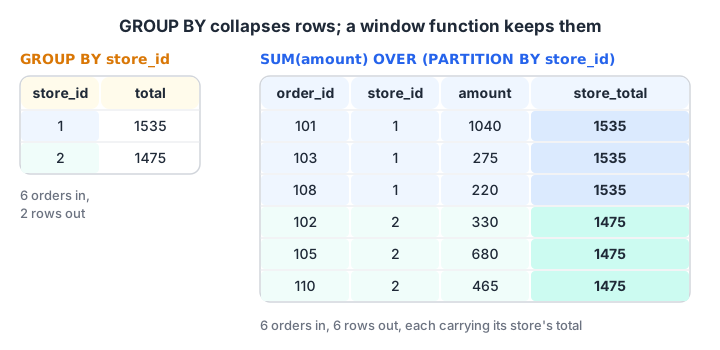
GROUP BY returns one row per store. SUM() OVER (PARTITION BY store_id) returns every order, each carrying its store's total.
SELECT order_id, store_id, amount,
       SUM(amount) OVER (PARTITION BY store_id) AS store_total
FROM orders;
How does the OVER clause work?
The OVER clause defines the window. It has three optional parts:
- PARTITION BY splits the rows into independent groups, such as one per store. Without it, the whole result is one partition.
- ORDER BY sorts rows inside each partition. Ranking functions and running totals need it.
- A frame, such as
ROWS BETWEEN 2 PRECEDING AND CURRENT ROW, limits which rows around the current one are included.
Window functions run after WHERE, GROUP BY and HAVING, just before the final ORDER BY. That is why they can see grouped results, and also why you cannot filter on them in WHERE.
Ranking functions: ROW_NUMBER, RANK and DENSE_RANK
All three number the rows of each partition in the ORDER BY order. They differ only in how they treat ties.
| Function | Ties get | Next value after a tie | Example for 100, 90, 90, 80 |
|---|---|---|---|
ROW_NUMBER() |
Different numbers | Continues | 1, 2, 3, 4 |
RANK() |
The same number | Skips | 1, 2, 2, 4 |
DENSE_RANK() |
The same number | Does not skip | 1, 2, 2, 3 |
Malwa Mart's orders have two ties on date: two orders on 1 March and two on 8 March. Ranking orders by date shows the difference.
import sqlite3

con = sqlite3.connect(":memory:")
con.executescript("""
CREATE TABLE orders (order_id INT, customer_id INT, store_id INT, order_date TEXT, amount INT, payment_mode TEXT);
INSERT INTO orders VALUES
 (101,1,1,'2026-03-01',1040,'UPI'), (102,2,2,'2026-03-01',330,'Cash'), (103,1,1,'2026-03-03',275,'UPI'),
 (104,3,3,'2026-03-04',180,'Card'), (105,4,2,'2026-03-05',680,'UPI'), (106,2,4,'2026-03-07',120,'Cash'),
 (107,5,3,'2026-03-08',1560,'Card'), (108,6,1,'2026-03-08',220,'UPI'), (109,4,4,'2026-03-10',340,NULL),
 (110,1,2,'2026-03-12',465,'Cash'), (111,6,3,'2026-03-14',NULL,'UPI');
""")
print("sqlite", sqlite3.sqlite_version, "(window functions need 3.25+)")

query = """
SELECT order_id, order_date,
       ROW_NUMBER() OVER (ORDER BY order_date) AS row_num,
       RANK()       OVER (ORDER BY order_date) AS rnk,
       DENSE_RANK() OVER (ORDER BY order_date) AS dense
FROM orders
ORDER BY order_date, order_id
LIMIT 8
"""
for row in con.execute(query):
    print(row)
Orders 107 and 108 share 8 March, so RANK gives both 7 and jumps to 9 for the next order, while DENSE_RANK gives both 6 and continues with 7. ROW_NUMBER breaks the tie arbitrarily. Add a tiebreaker, such as ORDER BY order_date, order_id, if you need the same numbering every time.
Top N per group: the biggest order in each store
"Show the largest order in each store" is a classic interview question. Number the orders inside each store by amount, then keep row number 1. Because WHERE runs before window functions, you compute the number in a CTE and filter outside it.
import sqlite3

con = sqlite3.connect(":memory:")
con.executescript("""
CREATE TABLE orders (order_id INT, customer_id INT, store_id INT, order_date TEXT, amount INT, payment_mode TEXT);
INSERT INTO orders VALUES
 (101,1,1,'2026-03-01',1040,'UPI'), (102,2,2,'2026-03-01',330,'Cash'), (103,1,1,'2026-03-03',275,'UPI'),
 (104,3,3,'2026-03-04',180,'Card'), (105,4,2,'2026-03-05',680,'UPI'), (106,2,4,'2026-03-07',120,'Cash'),
 (107,5,3,'2026-03-08',1560,'Card'), (108,6,1,'2026-03-08',220,'UPI'), (109,4,4,'2026-03-10',340,NULL),
 (110,1,2,'2026-03-12',465,'Cash'), (111,6,3,'2026-03-14',NULL,'UPI');
""")

query = """
WITH ranked AS (
    SELECT order_id, store_id, amount,
           ROW_NUMBER() OVER (PARTITION BY store_id ORDER BY amount DESC) AS rn,
           ROUND(100.0 * amount / SUM(amount) OVER (PARTITION BY store_id), 1) AS pct_of_store
    FROM orders
)
SELECT store_id, order_id, amount, pct_of_store
FROM ranked
WHERE rn = 1
ORDER BY store_id
"""
for row in con.execute(query):
    print(row)
At Rajwada (store 3), order 107 is 89.7% of the store's revenue, which tells the owner that Rajwada's strong month rests on one customer. Vijay Nagar's top order is 67.8% of its total.
Quick check
Scores are 100, 90, 90 and 80. What does DENSE_RANK() OVER (ORDER BY score DESC) return?
DENSE_RANK gives ties the same rank and does not skip the next number. RANK would give 1, 2, 2, 4.
Quick check
Why can't you write WHERE ROW_NUMBER() OVER (ORDER BY amount) = 1?
The logical order is FROM, WHERE, GROUP BY, HAVING, then window functions. Compute the number in a CTE or subquery and filter it outside.
Running totals and moving averages with SUM() OVER
Add ORDER BY inside OVER to an aggregate, and it becomes cumulative: each row sees all rows from the start of its partition up to itself. That is a running total.
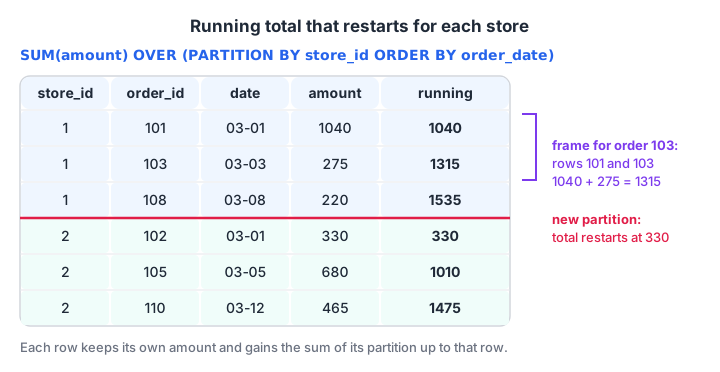
PARTITION BY restarts the running total for each store. The frame grows by one row as the window slides down.
ROWS vs RANGE: the default frame trap
When you write only ORDER BY inside OVER, the default frame is RANGE BETWEEN UNBOUNDED PRECEDING AND CURRENT ROW. RANGE treats rows with the same ORDER BY value as one step, so tied rows get the same running total. ROWS moves one physical row at a time.
import sqlite3

con = sqlite3.connect(":memory:")
con.executescript("""
CREATE TABLE orders (order_id INT, customer_id INT, store_id INT, order_date TEXT, amount INT, payment_mode TEXT);
INSERT INTO orders VALUES
 (101,1,1,'2026-03-01',1040,'UPI'), (102,2,2,'2026-03-01',330,'Cash'), (103,1,1,'2026-03-03',275,'UPI'),
 (104,3,3,'2026-03-04',180,'Card'), (105,4,2,'2026-03-05',680,'UPI'), (106,2,4,'2026-03-07',120,'Cash'),
 (107,5,3,'2026-03-08',1560,'Card'), (108,6,1,'2026-03-08',220,'UPI'), (109,4,4,'2026-03-10',340,NULL),
 (110,1,2,'2026-03-12',465,'Cash'), (111,6,3,'2026-03-14',NULL,'UPI');
""")

query = """
SELECT order_id, order_date, amount,
       SUM(amount) OVER (ORDER BY order_date) AS range_total,
       SUM(amount) OVER (ORDER BY order_date, order_id ROWS UNBOUNDED PRECEDING) AS rows_total,
       ROUND(AVG(amount) OVER (ORDER BY order_date, order_id
                               ROWS BETWEEN 2 PRECEDING AND CURRENT ROW), 1) AS moving_avg_3
FROM orders
ORDER BY order_date, order_id
"""
print("order | date | amount | range_total | rows_total | moving_avg_3")
for row in con.execute(query):
    print(row)
On 1 March, range_total shows 1,370 for both orders, because RANGE adds the whole day at once. rows_total shows 1,040 and then 1,370, one bill at a time. Both reach 5,210 at the end. The three-order moving average smooths out the spike from order 107.
Quick check
Which clause makes a running total restart for each store?
PARTITION BY splits rows into independent windows, so the cumulative SUM starts again at each store's first row.
LAG and LEAD: comparing with the previous row
LAG(column) returns the value from the previous row in the window, and LEAD(column) returns the next one. They replace many self joins with something far simpler.
"How many days passed between each customer's visits?" needs each order's previous date for the same customer.
SELECT customer_id, order_id, order_date,
       LAG(order_date) OVER (PARTITION BY customer_id ORDER BY order_date) AS previous_visit,
       julianday(order_date)
         - julianday(LAG(order_date) OVER (PARTITION BY customer_id ORDER BY order_date)) AS days_gap
FROM orders
ORDER BY customer_id, order_date;
Asha's three orders show gaps of NULL (her first visit), 2 days and 9 days. The self join article found the same gaps with a self join, which also returned non-consecutive pairs such as orders 101 and 110. LAG(amount, 1, 0) takes an offset and a default, so the first row shows 0 instead of NULL.
Other useful window functions
| Function | What it returns | Typical use |
|---|---|---|
NTILE(n) |
Bucket number 1 to n | Split customers into 4 quartiles by spend |
FIRST_VALUE(col) |
First value in the frame | Each order compared with the store's first order |
LAST_VALUE(col) |
Last value in the frame | Needs a full frame to work as expected |
PERCENT_RANK() |
Relative rank from 0 to 1 | Percentile position of each order |
COUNT(*) OVER (...) |
Number of rows in the window | Orders per customer on every row |
Common mistakes with SQL window functions
- Filtering in WHERE.
WHERE ROW_NUMBER() OVER (...) = 1is an error. Wrap the query in a CTE or subquery and filter outside. - Forgetting ORDER BY inside OVER. Without it,
SUM() OVER (PARTITION BY ...)gives the partition total on every row, not a running total. - The RANGE default with ties. Add a unique tiebreaker and
ROWSfor a true row-by-row running total. - LAST_VALUE surprises. With the default frame it returns the current row. Use
ROWS BETWEEN UNBOUNDED PRECEDING AND UNBOUNDED FOLLOWING. - Old database versions. MySQL 5.7 and SQLite before 3.25 have no window functions.
Window functions appear in almost every analyst interview, because they test whether you understand rows, groups and order together.
To prepare for them with structured classroom practice, Debugshala's data analytics course with placement assistance is taught at Old Palasia, and you can keep practising with free MCQ sets on Debugshala Test. Next in this series, SQL CASE WHEN adds conditional logic to everything you have learned.
Key takeaways
- Window functions add a calculated column to every row without collapsing rows.
- OVER (PARTITION BY ... ORDER BY ... frame) defines which rows each calculation sees.
- ROW_NUMBER, RANK and DENSE_RANK differ only in how they handle ties.
- SUM() OVER with ORDER BY gives running totals; a ROWS frame gives moving averages.
- LAG and LEAD compare a row with the previous or next row in its partition.
- Filter window results in an outer query or CTE, never in WHERE.
FAQ
What are window functions in SQL?
Window functions calculate values across a set of rows related to the current row, such as a rank, running total or previous value, and return a result on every row. They use an OVER clause to define the window. Unlike GROUP BY, they do not reduce the number of rows returned.
What is the difference between RANK and DENSE_RANK?
Both give tied rows the same rank. RANK then skips numbers, so scores 100, 90, 90, 80 rank as 1, 2, 2, 4. DENSE_RANK does not skip, giving 1, 2, 2, 3. ROW_NUMBER never ties and gives 1, 2, 3, 4. Choose based on whether gaps matter in your report.
What is the difference between PARTITION BY and GROUP BY?
GROUP BY collapses each group into one output row, so detail rows disappear. PARTITION BY, used inside OVER, divides rows into groups for a window function but keeps every row, adding the result as a new column. You can use both in one query, since window functions run after grouping.
Does SQLite support window functions?
Yes, since SQLite 3.25.0, released in 2018. It supports ranking functions, LAG and LEAD, aggregate windows and ROWS, RANGE and GROUPS frames. Recent Python builds include a much newer SQLite, so the examples on this page run directly with Python's sqlite3 module.
Where can I learn SQL window functions for analyst interviews in Indore?
Debugshala, a training and placement institute at Old Palasia, Indore, covers window functions as part of the SQL module in its Data Analytics course. Classes are offline in English and Hindi, freshers, non-IT graduates and people with a year gap can join, placement assistance is offered, and a free demo class comes first.
From the team behind this site
Go further with the Data Analytics Course at Debugshala
These tutorials are written by Debugshala, a training and placement institute at Old Palasia, Indore. The classroom course adds live mentoring, real projects and interview preparation.
- Offline classes at Old Palasia, Indore
- Free demo class before you pay
- Non-IT, fresher and year-gap friendly
- Placement assistance
700+ students placed · 200+ hiring partners · 4.9★ Google rating
