

What is TallyPrime? Features, Uses and How It Works
What is TallyPrime? Learn what Tally does, how masters, vouchers and reports fit together, editions, Educational mode and what's new in TallyPrime 7.2.
Picture Ramesh, who runs a wholesale shop for pulses and spices in Siyaganj, Indore. He keeps a bill book, a cash diary and a stock register.
Every March his accountant spends two weeks copying those registers into ledgers and hunting for why the cash diary doesn't match the drawer. Ramesh learns his yearly profit in May.
Now imagine each bill typed once, and that single entry updates the customer's account, the cash balance, the stock register and the profit figure together. That is what TallyPrime gives Ramesh.
TallyPrime is accounting and business management software that records a business's transactions once and builds its ledgers, stock records, tax records and financial statements from them automatically.
In this series you will follow a made-up business, Narmada Traders, an Indore wholesaler of pulses, spices and atta. Each article adds one layer, from creating the company to reading its Balance Sheet.
What is TallyPrime used for?
TallyPrime is made by Tally Solutions, headquartered in Bengaluru. It replaced the older Tally.ERP 9, and the first TallyPrime release came out in November 2020. Shops, distributors, manufacturers and chartered accountant (CA) firms use it to keep their books.
You can think of its work in five jobs:
- Accounting. Record sales, purchases, payments and receipts, with a separate ledger for each party, bank and expense.
- Inventory. Track how much of each item you hold, where, and at what cost.
- Tax compliance. GST invoices and return data, e-invoices and e-way bills, plus TDS, TCS and payroll.
- Banking. Record cheques and transfers, and match your books with the bank statement.
- Reports. Day Book, Trial Balance, Profit & Loss A/c, Balance Sheet and outstanding bills in seconds.
The key point for a beginner is that you never "post" entries to a ledger by hand. You record a voucher, and TallyPrime posts it everywhere it belongs.
How does TallyPrime work? Masters, vouchers and reports
Masters are what stays fixed: company, groups, ledgers, stock items, units and godowns. You create each once and reuse it.
Vouchers are the transactions. A voucher is the digital version of a bill, cash slip or bank slip. A sales voucher for ₹11,800 to a retailer is one voucher.
Reports are calculated from vouchers. You never type one; you open it, pick a period with F2, and it is up to date.
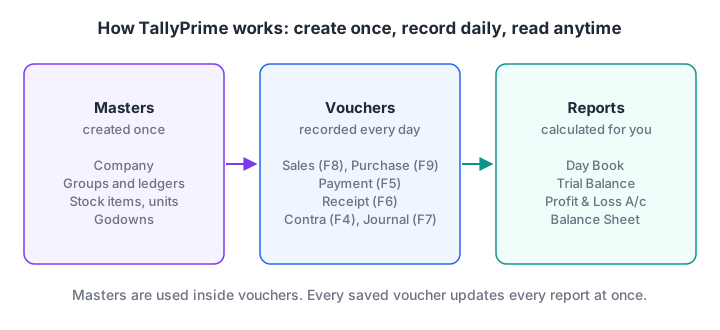
You create masters once, record vouchers every day, and TallyPrime builds every report from those vouchers.
A quick accounting refresher
Three words carry most of TallyPrime.
A ledger is one account, such as "Cash" or "Sharma Kirana Store", showing everything in and out for that party or item.
A voucher is the record of one transaction. Every voucher touches at least two ledgers, because money always comes from somewhere and goes somewhere.
Debit and credit are the two sides of each voucher. When Narmada Traders sells goods on credit to Sharma Kirana Store, Sharma's ledger is debited (they owe you) and the Sales ledger is credited (you earned income). The two sides are always equal, which is why the books balance.
Quick check
In TallyPrime, which of these is a master rather than a voucher?
Masters such as ledgers are created once and reused. Bills and payments are transactions, so they are vouchers.
The Gateway of Tally and the TallyPrime screen
When you open a company, the main screen is the Gateway of Tally. TallyPrime arranges it into four groups: Masters, Vouchers, Utilities and Reports.
Under Masters you will find Create, Alter and Chart of Accounts. Under Vouchers you will find Vouchers and Day Book. Under Reports you will see Balance Sheet, Profit & Loss A/c, Stock Summary and Display More Reports, which opens the full list.
Two bars sit around the Gateway:
- The top menu. Alt+K (Company), Alt+Y (Data), Alt+Z (Exchange), Alt+G (Go To), Alt+E (Export), Alt+P (Print) and Alt+M (Share, for e-mail or WhatsApp). F1 opens Help.
- The right button bar. Function keys such as F2 (change date or period), F3 (switch company), F11 (Company Features) and F12 (Configure) change how the current screen behaves.
The most useful key is Alt+G (Go To). Press it anywhere, type "trial", press Enter, and you are in the Trial Balance. Ctrl+G (Switch To) does the same but replaces the screen you are on.
To save almost any screen, press Ctrl+A. To go back, press Esc. The TallyPrime shortcut keys guide in this series lists the rest.
TallyPrime editions and Educational mode
You don't need to buy anything to learn TallyPrime. You download it from Tally Solutions' website, install it, and run it without a licence in Educational mode.
In Educational mode almost every feature works, except connected online services, but vouchers can be dated only the 1st, 2nd or 31st of a month. That is enough for this series.
Businesses choose a licence:
| Option | Who uses it | Key difference |
|---|---|---|
| Silver | One person on one computer | Single-user licence |
| Gold | Several staff on an office network (LAN) | Multi-user licence |
| Rental | Businesses that prefer a subscription | Pay for a period instead of buying |
| TallyPrime Edit Log | Firms that need an audit trail | Edit Log is always on and can't be switched off |
Edit Log records who changed a master or voucher, and when.
Connected services such as e-invoicing and e-way bills need an active Tally Software Services (TSS) subscription. Check current prices with Tally Solutions.
Quick check
In TallyPrime Educational mode, on which dates can you record vouchers?
Educational mode works without a licence, but it limits voucher dates to the 1st, 2nd and 31st of a month.
What's new in TallyPrime 7.2?
This series uses TallyPrime 7.2, released on 12 October 2026 and, as of November 2026, the latest release. According to Tally's release notes, its changes are mostly compliance polish:
- Invoice print templates now also work for Purchase Orders.
- e-Invoicing and e-Way Bill logins can now stay active for up to 30 days, alongside the earlier 6-hour session.
- HSN/SAC Summary data can be exported for GSTR-9 reconciliation.
On an older 6.x or 7.x release, the menus in this series look almost the same.
How to learn TallyPrime step by step
Learn TallyPrime in the order an accountant sets up a business, because each step depends on the one before.
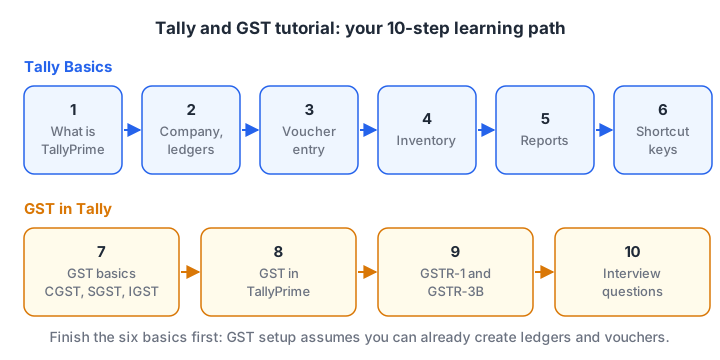
Six articles build your Tally basics, then four take you through GST from the law to the return.
Tally Basics
- What is TallyPrime (this article): the big picture.
- Create a company, groups and ledgers: set up Narmada Traders and its chart of accounts.
- Voucher entry: record sales, purchases, payments, receipts, contra and journal entries.
- Inventory management: stock items, units of measure and godowns.
- Financial reports: Day Book, Trial Balance, Profit & Loss and Balance Sheet.
- Shortcut keys: the keys that make you fast.
GST in Tally
- GST basics in India: CGST, SGST, IGST and input tax credit explained.
- GST in TallyPrime: turn on GST and raise a GST invoice.
- GST returns: GSTR-1, GSTR-3B and reconciliation.
- Tally and GST interview questions: prepare for accounts jobs.
Common mistakes beginners make in TallyPrime
Starting with vouchers before masters. If the ledgers are wrong, every report built on them is wrong.
Putting a ledger under the wrong group. A loan put under Sundry Debtors shows up as money customers owe you. The Balance Sheet looks fine but tells the wrong story.
Ignoring the date. A voucher is saved on the date shown at the top. Press F2 to set it first.
TallyPrime and data analysis
Analysts often export TallyPrime data (Alt+E) to Excel to compare months or customers, so the Excel for data analysis guide is a good next step. For a wider route from accounts into analytics, look at Debugshala's data analytics programme in Indore.
Key takeaways
- TallyPrime is accounting and business management software from Tally Solutions, the successor to Tally.ERP 9.
- It works in three layers: masters (created once), vouchers (recorded daily) and reports (calculated automatically).
- The Gateway of Tally groups everything into Masters, Vouchers, Utilities and Reports, and Alt+G reaches any screen.
- You can learn every feature free in Educational mode, with voucher dates limited to the 1st, 2nd and 31st.
- This series uses TallyPrime 7.2. Next, create your first company and ledgers.
FAQ
Is TallyPrime free to learn?
Yes. You can download TallyPrime and use it without a licence in Educational mode. Almost every feature works, but vouchers can be recorded only on the 1st, 2nd and 31st of a month. That limit doesn't matter for learning, because you can practise every voucher type and report on those dates.
What is the difference between Tally.ERP 9 and TallyPrime?
TallyPrime is the successor to Tally.ERP 9, first released in November 2020. The accounting logic is the same, but the screens were redesigned around the Go To search (Alt+G), a top menu bar and consistent function keys. Some shortcuts changed, so Tally.ERP 9 tutorials can mislead you on key combinations.
Do I need an accounting background to learn TallyPrime?
No, but you need the basics: what a ledger, a voucher, a debit and a credit are. This series explains each term as it appears. Commerce students pick up TallyPrime fastest, but graduates from other streams can learn it with a few weeks of regular practice on real-looking transactions.
Which TallyPrime version should I learn?
Learn the latest release, which is TallyPrime 7.2 as of November 2026. Menus have stayed very similar across TallyPrime releases, so skills from 7.2 carry over to the 5.x, 6.x and 7.x versions many offices still run. Avoid starting with Tally.ERP 9, because its shortcuts differ.
Where can I learn TallyPrime in Indore?
Debugshala, an IT training and placement institute in Indore, teaches TallyPrime at its Old Palasia campus, with classes in English and Hindi and a free demo class before you pay. There is no separate Tally page on its website yet, so ask Debugshala about Tally classes directly. You can also take aptitude and reasoning quizzes on Debugshala Test.
From the team behind this site
Go further with the Data Analytics Course at Debugshala
These tutorials are written by Debugshala, a training and placement institute at Old Palasia, Indore. The classroom course adds live mentoring, real projects and interview preparation.
- Offline classes at Old Palasia, Indore
- Free demo class before you pay
- Non-IT, fresher and year-gap friendly
- Placement assistance
700+ students placed · 200+ hiring partners · 4.9★ Google rating
