

Inventory in TallyPrime: Stock Items, Units and Godowns
Set up inventory in TallyPrime: stock groups, categories, simple and compound units, godowns and stock items with opening stock, plus how vouchers move stock.
Ask a dal wholesaler in Indore, "How many bags of toor dal do you have?" The godown boy counts and says "around forty".
If it's really 32, the owner promises 40 bags and loses the order. If it's 48, eight bags of cash sit unnoticed until the dal goes stale.
TallyPrime answers exactly, for every item and godown, by counting every bag in and out through the vouchers you already enter.
Inventory management in TallyPrime is the tracking of stock quantities and values for each item and location, updated automatically by purchase, sales and stock vouchers.
You will add inventory to Narmada Traders, the made-up Indore wholesaler from the earlier articles, and see how the July vouchers from voucher entry change its stock.
How to enable inventory in TallyPrime
Inventory options live in F11 (Company Features), in the Inventory section.
- From the Gateway of Tally, press F11.
- Set Maintain Inventory to Yes.
- Set Integrate Accounts with Inventory to Yes, so the value of stock appears in your Balance Sheet and Profit & Loss A/c.
- Turn on only what you need from the rest: Enable Batches and Maintain Expiry Date for Batches for medicines or food with expiry, Enable multiple Price Levels for separate wholesale and retail rates, Use Discount column in invoices if you give trade discounts.
- Press Ctrl+A to save.
Narmada Traders turns on the first two only.
The five inventory masters in TallyPrime
Inventory masters work like account masters. A stock item is like a ledger, and a stock group is like an account group.
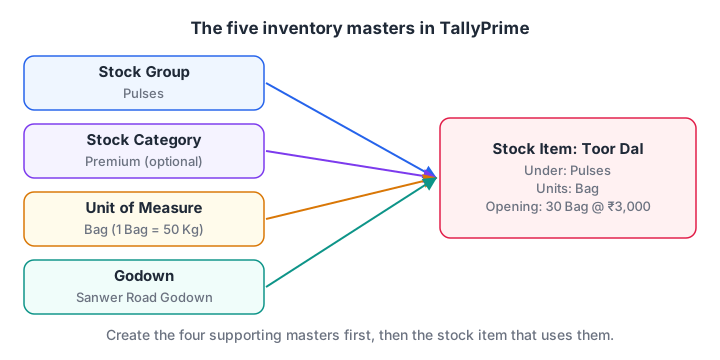
A stock item sits under one stock group, uses a unit, can carry a category, and is stored in one or more godowns.
| Master | What it is | Narmada Traders example |
|---|---|---|
| Stock Group | A family of similar items, for totals in reports | Pulses, Spices |
| Stock Category | A second, cross-cutting classification | Premium, Economy |
| Unit of Measure | How you count the item | Bag, Kg, Pkt |
| Godown | Where the stock is kept | Main Location (shop), Sanwer Road Godown |
| Stock Item | The actual product you buy and sell | Toor Dal, Chana Dal, Haldi Powder 1 kg |
You don't need all five. A small shop can work with just units and stock items.
How to create stock groups and categories
Stock group. Narmada Traders wants totals for pulses and for spices.
- Press Alt+G (Go To) > Create Master > Stock Group.
- Name:
Pulses. Under:Primary. - Should quantities of items be added: Yes, because every pulse is counted in bags. Only say Yes when all items in the group use the same unit, or the total will mix bags with packets.
- Press Ctrl+A. Repeat for
Spices.
Stock category. Categories cut across groups. "Premium" can include both a premium toor dal and a premium haldi. Create one with Alt+G > Create Master > Stock Category, give it a name, and leave Under as Primary. If the stock item screen doesn't show a Category field, press F12 on that screen and turn on the stock category option.
How to create units of measure
A unit tells TallyPrime how to count. TallyPrime has two kinds.
A simple unit is a single unit such as Bag, Kg or Pkt.
- Alt+G > Create Master > Units.
- Type:
Simple. - Symbol:
Bag. Formal name:Bags. - Number of decimal places:
0, since you never sell half a bag. A unit can have up to four decimal places, useful forKgif you sell loose dal. - Ctrl+A.
A compound unit links two simple units with a fixed conversion. Choose Type Compound, then set First Unit Bag, Conversion 50, Second unit Kg, to say "1 Bag of 50 Kg". Create the simple units first.
Alternate units. If an item is bought in one unit and sometimes sold in another, set Use Alternate Units to Yes with F12 on the stock item screen. Narmada Traders buys toor dal in 50 kg bags but occasionally sells it by the kilogram, so Bag is the main unit and Kg is the alternate (1 Bag = 50 Kg).
How to create godowns in TallyPrime
A godown is any place where stock is kept: a warehouse, a shop or a cold store. Every company starts with one called Main Location, and with a single location you never need another.
Narmada Traders also rents a store room on Sanwer Road.
- Alt+G > Create Master > Godowns.
- Name:
Sanwer Road Godown. - Under:
Primary, orMain Locationif you want it to roll up under the shop. - Ctrl+A.
Godowns can be nested, such as "Rack A" under "Indore Warehouse".
To create many godowns at once, go to Gateway of Tally > Chart of Accounts > Godowns, press Alt+H (Multi-Masters) and choose Multi Create.
Quick check
Which godown exists in every new TallyPrime company by default?
TallyPrime creates an internal godown called Main Location, and all stock goes there until you create other godowns.
How to create a stock item with opening stock
Now create the items themselves.
- Alt+G > Create Master > Stock Item.
- Name:
Toor Dal. - Under:
Pulses. - Units:
Bag. AddKgas the alternate unit if you turned that on. - Opening Balance: Quantity
30 Bag, Rate3,000. TallyPrime calculates the value, ₹90,000. If you enter the value instead, it works out the rate. - Ctrl+A.
These opening figures complete the setup from company, groups and ledgers. The ledgers alone left a gap of ₹1,73,500; the opening stock fills it exactly.
| Stock item | Group | Unit | Opening qty | Rate (₹) | Value (₹) |
|---|---|---|---|---|---|
| Toor Dal | Pulses | Bag | 30 | 3,000 | 90,000 |
| Chana Dal | Pulses | Bag | 25 | 2,500 | 62,500 |
| Haldi Powder 1 kg | Spices | Pkt | 140 | 150 | 21,000 |
| Total | 1,73,500 |
GST details on a stock item (HSN code and tax rate) are added once GST is enabled. That is covered in GST in TallyPrime.
How do vouchers update stock?
Once items exist, you don't record stock separately. The vouchers you already enter move it.
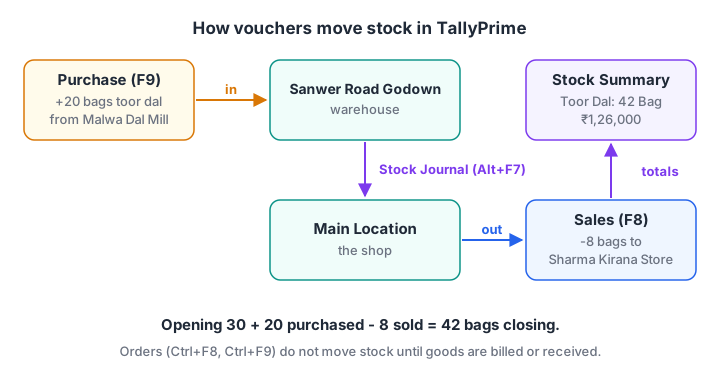
Purchases add to the godown you choose, sales take from it, and a Stock Journal moves stock between godowns.
- A Purchase (F9) in Item Invoice mode adds quantity. On the 1 July purchase, the 20 bags of toor dal go to the godown you select in the item's allocation screen.
- A Sales (F8) invoice reduces quantity from the godown you pick.
- A Stock Journal (Alt+F7, under F10 > Inventory Vouchers) moves stock between godowns without a sale, for example 15 bags from Sanwer Road to the shop.
- Sales Orders (Ctrl+F8) and Purchase Orders (Ctrl+F9) record promises. They don't change stock until you bill or receive the goods.
After the July vouchers, the stock moves like this:
| Item | Opening | In (purchase) | Out (sales) | Closing qty | Closing value at ₹ cost |
|---|---|---|---|---|---|
| Toor Dal | 30 | 20 | 8 | 42 Bag | 1,26,000 |
| Chana Dal | 25 | 0 | 2 | 23 Bag | 57,500 |
| Haldi Powder 1 kg | 140 | 0 | 0 | 140 Pkt | 21,000 |
| Total | 2,04,500 |
Quick check
You move 15 bags from your warehouse to your shop. Which voucher records it?
A Stock Journal (Alt+F7) transfers stock between godowns without a sale or purchase.
How TallyPrime values closing stock
Closing stock value decides your gross profit. TallyPrime values each item by a costing method, and the default is Average Cost. All toor dal here cost ₹3,000, so the average is ₹3,000 a bag.
Other methods include FIFO (first in, first out), Last Purchase Cost and Standard Cost. You can change the method per item through F12 on the stock item screen. Pick one method and stay with it; changing methods mid-year changes your profit figures.
Inventory reports to check
- Stock Summary: Gateway of Tally > Stock Summary, or Alt+G and type "stock summary". It lists each item's closing quantity, rate and value. You can drill down from a stock group to the items inside it.
- Godown Summary: Alt+G and type "godown summary", or Display More Reports > Inventory Books > Godowns. It shows stock in each godown.
Exporting the Stock Summary with Alt+E and building a pivot table in Excel is a quick way to compare items by month.
Common inventory mistakes
Mixing units in one group. If Pulses holds bags and Spices holds packets, don't add quantities at a parent group, or you'll see a meaningless total.
Negative stock. Billing goods before recording their purchase makes stock negative.
Forgetting the godown. With multiple godowns, a sale billed from the wrong godown leaves one showing stock that isn't there.
Using Accounting Invoice for goods. Accounting Invoice mode doesn't touch stock. Use Item Invoice for anything with quantity.
Practise the counting logic away from the screen, too: the quantitative aptitude quizzes on Debugshala Test sharpen exactly this kind of arithmetic.
Key takeaways
- Enable inventory with F11 > Maintain Inventory and Integrate Accounts with Inventory.
- The five inventory masters are stock groups, stock categories, units, godowns and stock items. Each is created with Alt+G > Create Master.
- Units can be simple, compound (1 Bag = 50 Kg) or alternate units on an item.
- Purchase and sales vouchers in Item Invoice mode update stock; a Stock Journal moves it between godowns.
- Average Cost is the default costing method. Next, read your stock and accounts together in TallyPrime reports.
FAQ
What is a godown in TallyPrime?
A godown is any location where you keep stock, such as a warehouse, shop or store room. TallyPrime creates one called Main Location by default. Create more with Alt+G > Create Master > Godowns, and TallyPrime will track each item's quantity separately in every godown.
What is the difference between a stock group and a stock category?
A stock group is the main family an item belongs to, such as Pulses. A stock category is an optional second classification that cuts across groups, such as Premium or Economy. Groups give you totals by product family; categories let you see the same stock sliced a different way.
What is a compound unit in TallyPrime?
A compound unit combines two simple units with a fixed conversion, for example 1 Bag of 50 Kg or 1 Box of 12 Nos. You create it in Alt+G > Create Master > Units by choosing Type Compound, then the first unit, the conversion number and the second unit.
Which stock valuation method does TallyPrime use by default?
TallyPrime uses Average Cost as the default costing method for closing stock. You can change it per stock item to methods such as FIFO, Last Purchase Cost or Standard Cost. The method you choose affects closing stock value and therefore your gross profit.
Do analytics courses use inventory data like this?
Yes. Stock movement, slow-moving items and reorder levels are classic data analysis problems. Debugshala in Old Palasia, Indore teaches both sides: TallyPrime itself (talk to Debugshala about TallyPrime classes) and Debugshala's analytics course for commerce and non-IT graduates.
From the team behind this site
Go further with the Data Analytics Course at Debugshala
These tutorials are written by Debugshala, a training and placement institute at Old Palasia, Indore. The classroom course adds live mentoring, real projects and interview preparation.
- Offline classes at Old Palasia, Indore
- Free demo class before you pay
- Non-IT, fresher and year-gap friendly
- Placement assistance
700+ students placed · 200+ hiring partners · 4.9★ Google rating
