

Tally and GST Interview Questions for Accountants (with Answers)
Tally and GST interview questions with short answers: ledger groups, voucher keys, CGST vs IGST, ITC, GSTR-1 vs GSTR-3B and GSTR-2B reconciliation.
Picture the interview room at a mid-sized CA firm on MG Road, Indore. The partner slides a laptop across the table with TallyPrime open and says, "Our client sold goods worth ₹80,000 to a dealer in Surat. Enter it."
Many candidates can define IGST but then pick CGST and SGST without checking the party's state. The one who gets the job presses F8, notices Gujarat in the place of supply, picks IGST and checks Alt+A before saving. That is what the interview really tests: turning a rule into a correct entry, quickly.
A Tally and GST interview assesses whether an accounting candidate can record transactions correctly in TallyPrime, apply current GST rules, and prepare and reconcile GST returns.
The questions follow the usual interview order, with answers short enough to say aloud. Keys are from TallyPrime 7.2; GST facts are as of November 2026.
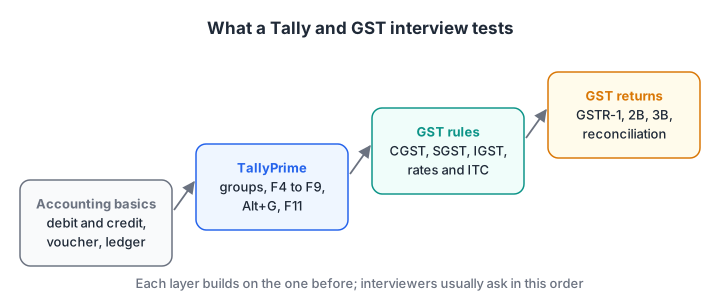
The four layers interviewers test, in the order they usually ask. Each layer depends on the one before it.
Accounting basics interviewers ask first
1. What is the difference between debit and credit?
Every transaction affects at least two accounts, one debited and one credited by the same amount. The golden rules: for a personal account, debit the receiver and credit the giver; for a real account, debit what comes in and credit what goes out; for a nominal account, debit expenses and losses and credit incomes and gains.
2. What is a voucher and what is a ledger?
A voucher is the record of one transaction, such as a sales invoice. A ledger is an account that collects every entry of one kind, such as all sales or one customer. In TallyPrime you enter vouchers and the ledgers update themselves. The voucher entry tutorial shows both together.
Quick check
An interviewer asks which group a term loan from SBI goes under. What do you say?
A loan backed by security, such as a bank term loan, goes under Secured Loans. Bank Accounts is for your own bank balances.
TallyPrime interview questions
3. How do you create a ledger in TallyPrime?
Go to Gateway of Tally > Create > Ledger, or press Alt+G and choose Create Master. Enter the name, select the group under Under, add details such as opening balance, and save with Ctrl+A. The company and ledgers guide covers the full screen.
4. Under which group do these ledgers go?
A favourite rapid-fire round:
| Ledger | Group in TallyPrime |
|---|---|
| A customer | Sundry Debtors |
| A supplier | Sundry Creditors |
| CGST, SGST, IGST | Duties & Taxes |
| Shop rent | Indirect Expenses |
| Freight on purchases | Direct Expenses |
| HDFC current account | Bank Accounts |
| Term loan from a bank | Secured Loans |
| Owner's capital | Capital Account |
| Sales | Sales Accounts |
5. What are the shortcut keys for the main vouchers?
F4 Contra, F5 Payment, F6 Receipt, F7 Journal, F8 Sales and F9 Purchase. Alt+F6 opens a Credit Note and Alt+F5 a Debit Note in TallyPrime. The TallyPrime shortcut keys guide lists the rest and shows what changed from Tally.ERP 9.
6. What is the difference between a Contra and a Payment voucher?
A Contra voucher moves money between cash and bank accounts only, such as depositing ₹20,000 cash into the bank. A Payment voucher records money going out to someone else, such as paying ₹15,000 rent. If either side is not a cash or bank ledger, it is not a contra.
7. How do you correct a wrong voucher?
Open the report that holds it (for example the Day Book), select the voucher and press Enter to alter it, then save with Ctrl+A. To remove it, use Alt+D to delete or Alt+X to cancel. Cancelling keeps the voucher and its number in the books, marked as cancelled, while deleting removes it entirely.
GST interview questions
8. What are CGST, SGST and IGST?
They are the parts of GST. On a supply within one state, CGST (to the Centre) and SGST (to the state) are charged at half the rate each. On a supply from one state to another, IGST is charged at the full rate. Whether a supply is intra-state or inter-state depends on the place of supply.
9. Work out the tax on this sale.
"An Indore firm sells goods worth ₹80,000 at 18% to a dealer in Surat. What is charged?" Surat is in Gujarat, so the sale is inter-state: IGST 18% = ₹14,400, invoice total ₹94,400. If the same goods went to Dewas, inside Madhya Pradesh: CGST ₹7,200 + SGST ₹7,200, same total.
10. What are the current GST rates?
Since 22 September 2025, after the 56th GST Council meeting, the main rates are 5% and 18%, with a special 40% rate for a short list of luxury and sin goods such as high-end cars and aerated drinks.
Many essentials are nil-rated or exempt. Mention that you would always check the rate for the item's HSN code rather than rely on a slab chart.
11. What is input tax credit, and when can you claim it?
ITC is the GST paid on purchases that you set off against GST collected on sales.
Under section 16 of the CGST Act you need a valid tax invoice, the invoice must appear in your GSTR-2B, you must have received the goods or services, the supplier must have paid the tax, and you must file your return. You must also pay the supplier within 180 days.
12. What is the GST registration threshold?
In most states, including Madhya Pradesh, registration is required once aggregate turnover crosses ₹40 lakh for suppliers of goods only, and ₹20 lakh for services. Some special category states have lower limits, and some businesses, such as those making inter-state taxable supplies of goods, must register whatever their turnover.
13. When is an e-invoice or an e-way bill needed?
E-invoicing applies to businesses whose aggregate turnover exceeded ₹5 crore in any financial year from 2017-18; those at ₹10 crore or more must report each e-invoice within 30 days. An e-way bill is generally needed when goods worth more than ₹50,000 move in a motor vehicle.
Quick check
Goods worth ₹80,000 at 18% go from Indore to Dewas. What is charged?
Dewas is in Madhya Pradesh, so the supply is intra-state and the 18% splits into 9% CGST and 9% SGST.
GST returns and reconciliation questions
14. What is the difference between GSTR-1, GSTR-2B and GSTR-3B?
GSTR-1 is your statement of sales, due on the 11th of the next month for monthly filers. GSTR-2B is the auto-drafted statement of credit available to you, generated on the 14th.
GSTR-3B is the summary return where you declare liability, claim ITC and pay tax, due on the 20th. Quarterly QRMP filers have different dates; the GST returns article has the full table.
15. You found an error in GSTR-1 after filing it. What now?
If GSTR-3B for that period is not yet filed, correct it through GSTR-1A, which can be filed once per period and flows into GSTR-3B. If GSTR-3B is already filed, amend the record in a later GSTR-1. GSTR-3B itself cannot be revised.
16. Why is the ITC in GSTR-2B lower than in my purchase register?
Usually because suppliers haven't reported those invoices, reported them late or used a wrong GSTIN. Invoices left pending in the Invoice Management System also stay out of GSTR-2B. Reconcile invoice by invoice and follow up with suppliers.
17. How do you reconcile GSTR-2B in TallyPrime?
Download GSTR-2B through Alt+Z (Exchange) > All GST Options > Download GST Returns, or import the portal file. Then press Alt+G and open GSTR-2B Reconciliation, which separates matched invoices, mismatches and invoices found only on the portal. Record any bills you missed and follow up on the rest.
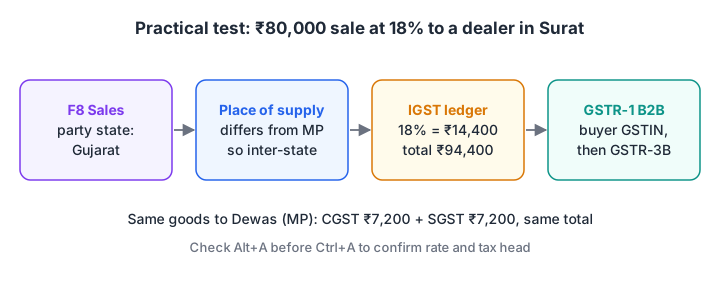
The practical test in one picture: a voucher in TallyPrime decides the ledger, the ledger decides the return table.
18. What is the late fee for GSTR-3B?
₹50 per day (₹25 CGST + ₹25 SGST) when tax is payable, and ₹20 per day for a nil return, subject to caps that depend on turnover. Interest at the notified rate of 18% a year applies to tax paid late in cash.
Quick check
Which return can correct a filed GSTR-1 before GSTR-3B is filed for the same period?
GSTR-1A is the optional amendment form for GSTR-1, filed once per period before GSTR-3B.
How should you prepare for a Tally and GST interview?
- Practise on a test company: ten ledgers and twenty vouchers, including an inter-state sale and a credit note.
- Answer with an example: "₹80,000 to Surat at 18% gives ₹14,400 IGST."
- Revise dates and thresholds the night before.
- Show you can export. Exporting a register with Alt+E and summarising it in Excel is a plus; a quick pass through Excel pivot tables helps.
- Take timed tests. Aptitude rounds often come first; practise on Debugshala Test.
If you would rather prepare with a trainer and a live TallyPrime setup, Debugshala teaches Tally at its Old Palasia campus; you can talk to Debugshala about learning Tally in Indore.
Common mistakes candidates make
- Quoting old GST slabs such as 12% and 28% for most goods.
- Mixing Contra and Payment. Contra is only between cash and bank.
- Giving theory without the key. Saying "go to the sales voucher" is weaker than "press F8".
- Forgetting the place of supply. It decides CGST + SGST versus IGST, every time.
Key takeaways
- Interviews move from accounting basics to TallyPrime, then GST rules, then returns and reconciliation.
- Answer with a definition, a ₹ example and the exact key or menu.
- Know the current GST facts: 5% and 18% main rates (40% for select goods), ₹40 lakh and ₹20 lakh registration thresholds, and the 11th, 14th and 20th return dates.
- Be ready to explain why GSTR-2B and your purchase register differ, and how you would fix it.
FAQ
What questions are asked in a Tally interview for freshers?
Freshers are usually asked about debit and credit rules, the difference between a ledger and a voucher, which group a ledger goes under, voucher shortcut keys and how to enable GST with F11. Many interviewers also ask you to record one sale or purchase live in TallyPrime, so practise entries, not just definitions.
Is TallyPrime knowledge enough for an accountant job?
It is a strong start, but most accountant roles also expect GST returns, basic TDS, bank reconciliation and Excel. Employers want someone who can record entries correctly and then check them against the GST portal. Pair TallyPrime practice with GST return filing and Excel lookups and pivot tables.
What is the difference between Tally.ERP 9 and TallyPrime?
TallyPrime is the successor to Tally.ERP 9, with a simpler keyboard-first interface built around Alt+G (Go To) and a top menu. Several shortcuts moved: Credit Note is now Alt+F6 instead of Ctrl+F8, and Debit Note is Alt+F5 instead of Ctrl+F9. Interviewers ask this to check you have used the current product.
Can I learn Tally with GST in Indore before my interview?
Yes. Debugshala teaches TallyPrime at its Old Palasia campus in Indore, including GST entries as part of learning Tally. Classes are in English and Hindi, fresh graduates and learners with a year gap are accepted, and there is a free demo class before you pay. Call +91-8982385539 or use the contact page.
Sources
- Keyboard Shortcuts in TallyPrime, TallyHelp, Tally Solutions (accessed November 2026)
- Release Notes for TallyPrime Release 7.2, TallyHelp, Tally Solutions (12 October 2026)
- How to Reconcile GSTR-2B Data in TallyPrime, TallyHelp, Tally Solutions (accessed November 2026)
- Recommendations of the 56th Meeting of the GST Council, PIB (3 September 2025)
- Nine Years of GST, PIB (30 June 2026)
- Section 16, CGST Act 2017, CBIC (accessed November 2026)
- FAQs on Form GSTR-1 and FAQs on Form GSTR-3B, GST Portal user guide (accessed November 2026)
- FAQs on Viewing Form GSTR-2B, GST Portal user guide (accessed November 2026)
- E-invoicing Mandate Under GST, GST e-invoice portal (accessed November 2026)
- E-Way Bill System FAQ, e-Way Bill portal (accessed November 2026)
- GST: An Update (registration thresholds), CBIC (May 2019)
From the team behind this site
Go further with the Data Analytics Course at Debugshala
These tutorials are written by Debugshala, a training and placement institute at Old Palasia, Indore. The classroom course adds live mentoring, real projects and interview preparation.
- Offline classes at Old Palasia, Indore
- Free demo class before you pay
- Non-IT, fresher and year-gap friendly
- Placement assistance
700+ students placed · 200+ hiring partners · 4.9★ Google rating
