

R Lists: Create, Access and Modify with $, [[ ]] and [ ]
Learn R lists through a real grocery order: create lists, read elements with $ and [[ ]], see why [ ] differs, add or remove items, and nest and loop.
A Malwa Mart delivery boy picks up a plastic sleeve at the Vijay Nagar counter. Inside it are the order number, the customer's name, a slip listing three items with their prices, and a sticker saying "paid online". Different kinds of things, all belonging to one order, all held together.
A vector couldn't hold this. A vector stores one type only, so the order number, the name and the TRUE/FALSE sticker would all be forced into text. What you need is a container that keeps each piece in its own natural type.
In R that sleeve is a list. Each piece of paper is an element, the label on it is the element's name, and the item slip, itself several values long, is a whole vector sitting inside one element.
A list in R is an ordered collection of elements that can each have a different data type and length, including vectors, data frames and other lists.
Lists come straight after R vectors because they fix the vector's one-type limit. They also matter more than they first seem: data frames, model results and JSON data are all lists underneath. Code here targets R 4.4+.
How do you create a list in R?
Call list() with the elements you want, usually giving each a name. str() (structure) is the best way to see what is inside a list, because it shows each element's type and first values on one line.
order_1001 <- list(
  order_id    = 1001L,
  customer    = "Ritika Jain",
  store       = "Vijay Nagar",
  items       = c("Basmati Rice 5kg", "Toor Dal 1kg", "Paneer 200g"),
  amounts     = c(520, 165, 90),
  paid_online = TRUE
)

length(order_1001)
names(order_1001)
str(order_1001)[1] 6
[1] "order_id" "customer" "store" "items" "amounts"
[6] "paid_online"
List of 6
$ order_id : int 1001
$ customer : chr "Ritika Jain"
$ store : chr "Vijay Nagar"
$ items : chr [1:3] "Basmati Rice 5kg" "Toor Dal 1kg" "Paneer 200g"
$ amounts : num [1:3] 520 165 90
$ paid_online: logi TRUEThe list has six elements, but items and amounts each hold three values. That is the key difference from a vector: an element can be any size.
How do you access list elements: $, [[ ]] and [ ]?
R gives you three ways to reach into a list. Two of them return the element's contents; one returns a smaller list. Mixing them up is the most common list bug.
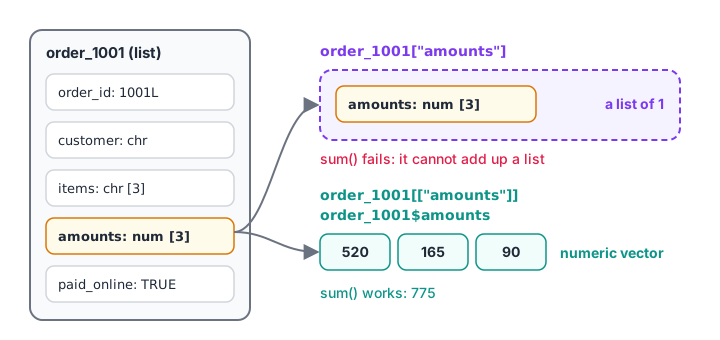
Single brackets hand you a smaller sleeve with the paper still inside. Double brackets and $ hand you the paper itself.
| Syntax | Returns | Example |
|---|---|---|
x$name |
The contents of one element | order_1001$amounts |
x[["name"]] or x[[3]] |
The contents of one element | order_1001[["amounts"]] |
x["name"] or x[1:2] |
A list containing those elements | order_1001[c("store", "items")] |
order_1001$customer
order_1001[["amounts"]]
sum(order_1001$amounts)
order_1001$items[2]

class(order_1001[["customer"]])
class(order_1001["customer"])[1] "Ritika Jain"
[1] 520 165 90
[1] 775
[1] "Toor Dal 1kg"
[1] "character"
[1] "list"order_1001$items[2] works in two steps: $items pulls out the character vector, and [2] picks its second element. Chaining like this is how you dig into nested data.
Here is what goes wrong with single brackets. order_1001["amounts"] is a list holding a vector, and sum() can't add up a list.
sum(order_1001["amounts"])
sum(order_1001[["amounts"]])Error in sum(order_1001["amounts"]) : invalid 'type' (list) of argument
[1] 775When to use $ and when to use [[ ]]
Use $ when you type a fixed name in your code; it is short and readable. Use [[ ]] when the name is stored in a variable, for example inside a loop or a function, because $ doesn't evaluate variables.
field <- "store"
order_1001[[field]]
order_1001$field[1] "Vijay Nagar"
NULLorder_1001$field looks for an element literally called "field", finds none, and returns NULL without any error. That silence makes it a sneaky bug.
Quick check
What does class(order_1001["store"]) return?
Single brackets return a sub-list. Use order_1001[["store"]] or order_1001$store to get the character value.
How do you add, change and remove list elements?
Assign to a name to add or update it. Assign NULL to delete it. The list shrinks, and later elements move up.
order_1001$delivery_slot <- "6-8 pm"
order_1001$paid_online   <- FALSE
order_1001$customer      <- NULL

names(order_1001)
order_1001$paid_online[1] "order_id" "store" "items" "amounts"
[5] "paid_online" "delivery_slot"
[1] FALSETo combine two lists, use c(list_a, list_b). To add a whole list as one element, assign it with [[ ]], as in order_1001[["address"]] <- list(area = "Vijay Nagar", pin = "452010").
Quick check
How do you remove the element note from a list x?
Assigning NULL deletes a list element. Assigning NA keeps the element but marks it missing.
Nested lists: storing many records
A list can contain lists. A list of orders, where each order is itself a list, is exactly how data from a web API or a JSON file looks once it arrives in R.
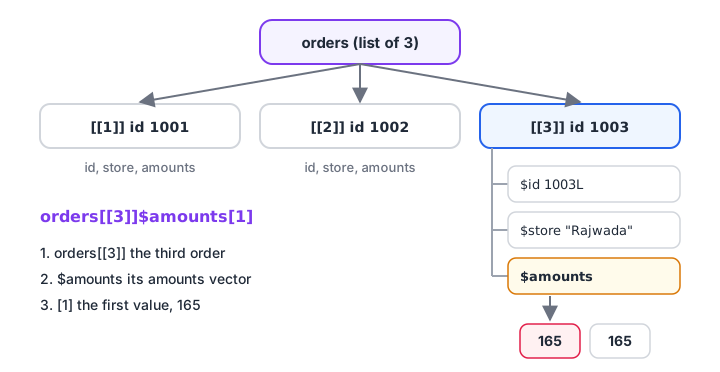
To reach one value in a nested list, follow the path from the outer list down: orders[[3]]$amounts[1].
orders <- list(
  list(id = 1001L, store = "Vijay Nagar", amounts = c(520, 165, 90)),
  list(id = 1002L, store = "Palasia",     amounts = c(60, 60, 60)),
  list(id = 1003L, store = "Rajwada",     amounts = c(165, 165))
)

length(orders)
orders[[2]]$store
orders[[3]]$amounts[1][1] 3
[1] "Palasia"
[1] 165Read orders[[3]]$amounts[1] from left to right: the third order, its amounts vector, the first value. Each step narrows the selection.
How do you loop over a list in R?
sapply() applies a function to every element and simplifies the result into a vector where it can. lapply() does the same but always returns a list. Both replace a hand-written loop.
totals <- sapply(orders, function(o) sum(o$amounts))
totals

stores <- sapply(orders, function(o) o$store)
names(totals) <- stores
totals

lapply(orders[1:2], function(o) length(o$amounts))[1] 775 180 330
Vijay Nagar Palasia Rajwada
775 180 330
[[1]]
[1] 3
[[2]]
[1] 3Since R 4.1 you can write \(o) sum(o$amounts) as a shorter form of function(o) sum(o$amounts). The whole family, including vapply() and mapply(), is covered in R apply, lapply and sapply.
unlist() flattens a list into a plain vector, coercing types if needed. It is handy once every element has the same type.
unlist(list(a = 1, b = 2:3))
unlist(list(qty = 2, item = "Sev 500g")) a b1 b2
1 2 3
qty item
"2" "Sev 500g" Where lists appear in everyday R
Many R functions return lists, so you will meet them even if you never call list() yourself.
- Splitting text.
strsplit()returns a list, because every string can split into a different number of pieces. - Data frames. A data frame is a list of equal-length column vectors, which is why
df$amountanddf[["amount"]]both work. - Model and test results.
t.test()andlm()return lists, and you pull out the p-value or coefficients with$.
strsplit(c("Poha 1kg", "Toor Dal 1kg"), " ")

df <- data.frame(id = c(1001L, 1002L), store = c("Vijay Nagar", "Palasia"))
is.list(df)
df[["store"]][[1]]
[1] "Poha" "1kg"
[[2]]
[1] "Toor" "Dal" "1kg"
[1] TRUE
[1] "Vijay Nagar" "Palasia" The data frame connection is so important that it gets its own lesson in R data frames. If you know Python, a named R list behaves much like a Python dictionary, and Python dictionaries is a good side-by-side read.
Common mistakes with R lists
- Using
[ ]when you want the contents.x["amounts"]is a list; usex[["amounts"]]orx$amounts. - Using
$with a variable.x$fieldlooks for a literal "field". Usex[[field]]. - Expecting an error for a missing name.
x$nmae(typo) returnsNULLsilently. Check withnames(x)or"name" %in% names(x). - Deleting by accident.
x$note <- NULLremoves the element. To store an empty value, usex["note"] <- list(NULL). - Indexing past the end with
[[ ]].orders[[10]]stops with "subscript out of bounds". - Calling
unlist()on mixed types. Numbers silently turn into text, as the secondunlist()example showed.
When you want structured practice and code reviews on topics like this, the Debugshala data analytics classroom course works through R lists on project data.
Key takeaways
- A list holds elements of any type and length, each optionally named.
$and[[ ]]return an element's contents;[ ]returns a sub-list.- Use
[[ ]]when the element name is stored in a variable. - Assign to add or change an element; assign
NULLto remove it. - Lists of lists model records such as orders and JSON data.
sapply()andlapply()apply a function to every element without a loop.- Next, arrange numbers in rows and columns with R matrices and arrays.
Ready to test yourself? Attempt R and Python quiz rounds on Debugshala Test.
FAQ
What is the difference between a list and a vector in R?
A vector holds values of a single type, so combining a number and text turns everything into text. A list keeps each element in its own type and allows different lengths. Use a vector for one column of values and a list for a mixed record or a collection of objects.
What is the difference between [ ] and [[ ]] in R?
Single brackets return a subset of the same type, so on a list they return a smaller list. Double brackets extract the actual contents of one element. With x <- list(a = 1:3), x["a"] is a list of length one, while x[["a"]] is the integer vector 1 2 3.
How do I convert a list to a vector in R?
Use unlist(), which flattens all elements into one vector and keeps names where it can. If the elements have different types, they are coerced to the most flexible one, usually character. For a list of equal-length records, converting to a data frame is often more useful than flattening.
How do I add an element to a list in R?
Assign to a new name, such as x$slot <- "6-8 pm", or to a new position with x[[length(x) + 1]] <- value. To append several elements, use c(x, list(a = 1, b = 2)). Growing a list inside a very long loop is slow, so create it at full length first when you can.
Is there an R programming class in Indore that covers lists and data structures?
Yes. Debugshala's data analytics training at its Old Palasia campus in Indore covers R data structures, including vectors, lists and data frames, with hands-on exercises in English and Hindi. Fresh graduates and learners with a year gap are welcome, and there is a free demo class first.
From the team behind this site
Go further with the Data Analytics Course at Debugshala
These tutorials are written by Debugshala, a training and placement institute at Old Palasia, Indore. The classroom course adds live mentoring, real projects and interview preparation.
- Offline classes at Old Palasia, Indore
- Free demo class before you pay
- Non-IT, fresher and year-gap friendly
- Placement assistance
700+ students placed · 200+ hiring partners · 4.9★ Google rating
