

R Data Types and Variables: numeric, character, logical
Learn R data types and variables: numeric, integer, character and logical, class() vs typeof(), conversion with as.*(), coercion rules, NA, NULL and dates.
Open the stock register at any Malwa Mart store and look at one row. The product name is text, "Toor Dal 1kg". The price has paise, 165.50. The quantity on the shelf is a whole number, 42. And the "reorder?" column holds a tick or a cross.
Now imagine a new clerk writes "out of stock" in the quantity column. The row looks fine to a human, but the evening total can no longer be added up, because one cell is text pretending to be a number.
R faces the same problem with every value it stores. It needs to know whether a value is a number, text or a yes/no flag, because that decides what you can do with it.
You add numbers, you paste text together, and you count ticks. That kind is called the value's data type, and the name you file it under is a variable.
A data type in R is the kind of value an object holds, such as a number, text or TRUE/FALSE, and it decides which operations R allows on that value.
This lesson follows Install R and RStudio. Type each block into the RStudio console or a script and compare your output with the one shown. All examples target R 4.4 or newer.
How do you create a variable in R?
You create a variable by assigning a value to a name with <-. RStudio types the arrow for you when you press Alt + - (Option + - on a Mac).
store_name  <- "Vijay Nagar"
bills_today <- 214L
avg_bill    <- 486.75
reorder_dal <- TRUE

store_name
bills_today * avg_bill[1] "Vijay Nagar"
[1] 104164.5Typing a variable's name on its own line prints its value. You can also assign with =, and it works the same at the top level, but most R style guides keep <- for assignment and = for function arguments.
Rules for variable names
- A name can contain letters, digits, dots and underscores, and must start with a letter (or a dot not followed by a digit).
- Names are case-sensitive:
Salesandsalesare different variables. - Reserved words such as
if,else,TRUE,NULLandfunctioncan't be used as names. - Use
snake_case, such asavg_bill. It is the most common style in modern R code.
What are the basic data types in R?
R has six atomic types. "Atomic" means each one holds a single kind of value, and every vector is built from exactly one of them. As an analyst you will use the first four almost every day.
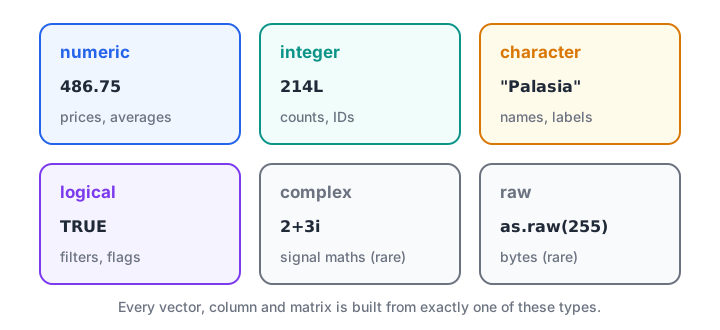
The six atomic data types in R. Numeric, integer, character and logical cover nearly all analysis work.
| Type | Example | Used for |
|---|---|---|
| numeric (double) | 486.75, 520 |
Prices, amounts, averages |
| integer | 214L |
Counts, IDs |
| character | "Palasia" |
Names, codes, labels |
| logical | TRUE, FALSE |
Flags and filter conditions |
| complex | 2+3i |
Signal processing, rarely in analytics |
| raw | as.raw(255) |
Bytes, almost never in analytics |
Notice that 520 is numeric, not integer. R stores plain numbers as decimals (doubles) unless you add the L suffix. That surprises people coming from other languages.
How do you check a data type: class() vs typeof()?
class() reports the type from the user's point of view, and is the one you check most. typeof() reports how R stores the value internally. For basic values they mostly agree, but they differ for numbers and for richer objects such as dates.
class(avg_bill)
typeof(avg_bill)
class(520)
class(520L)
class(store_name)
class(reorder_dal)
class(2 + 3i)[1] "numeric"
[1] "double"
[1] "numeric"
[1] "integer"
[1] "character"
[1] "logical"
[1] "complex"To test for one type, use the is. functions. They return a single TRUE or FALSE, which is useful inside if conditions later.
is.numeric(avg_bill)
is.character(bills_today)
is.integer(520)
is.integer(520L)
5L / 2L
5L %/% 2L[1] TRUE
[1] FALSE
[1] FALSE
[1] TRUE
[1] 2.5
[1] 2Dividing two integers with / gives a double, 2.5. Use %/% when you want whole-number division, for example to work out how many full boxes of 12 you can pack.
Quick check
What does class(520) return in R?
Plain numbers are stored as doubles, which class() reports as "numeric". Only 520L is an integer.
How do you convert data types in R?
Explicit conversion uses the as. family: as.numeric(), as.integer(), as.character() and as.logical(). This is your daily tool when a CSV file reads prices in as text.
as.numeric("520")
as.integer(18.9)
as.character(1499)
as.logical(c("TRUE", "false", "T", "yes"))
as.numeric("Rs. 520")[1] 520
[1] 18
[1] "1499"
[1] TRUE FALSE TRUE NA
[1] NA
Warning message:
NAs introduced by coercionThree things are worth noticing in that output.
as.integer()drops the decimal part. It does not round, so 18.9 becomes 18. Useround()first if you want 19.as.logical()understands"TRUE","true","T"and"false", but not"yes", which becomesNA."Rs. 520"can't be read as a number, so R returnsNAand warns you. Clean the text first, a job covered in string manipulation in R.
What is type coercion in R?
Coercion is the conversion R does on its own when you combine different types in one vector. A vector can hold only one type, so R picks the type that can represent everything without losing information.
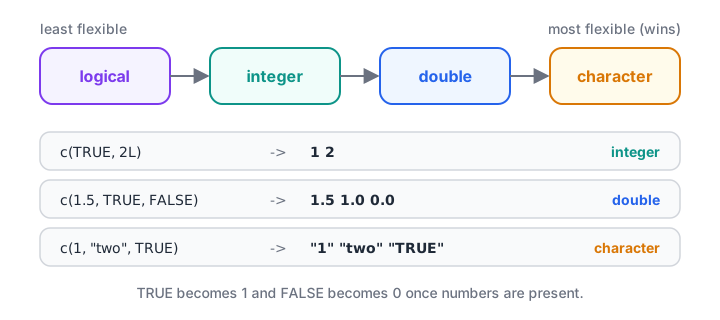
When types are mixed, R moves every value up to the most flexible type present. Character always wins.
c(1, "two", TRUE)
c(1.5, TRUE, FALSE)
c(1L, 2.5)
sum(c(TRUE, FALSE, TRUE, TRUE))
mean(c(TRUE, FALSE, TRUE, TRUE))[1] "1" "two" "TRUE"
[1] 1.5 1.0 0.0
[1] 1.0 2.5
[1] 3
[1] 0.75The first line shows the danger: one stray piece of text turns all your numbers into text, and sum() will refuse to run. The last two lines show a useful trick. TRUE counts as 1 and FALSE as 0, so sum() counts the TRUE values and mean() gives their share. "What fraction of orders were paid online?" becomes one line.
The same idea exists in Python, where True + True is 2. If you know Python's type conversion, the R functions will feel familiar.
Quick check
What is the result of c(10, "20", 30)?
Character is the most flexible type, so R coerces every element to text.
NA, NULL, NaN and Inf: special values
Real data has gaps, and R has dedicated values for them. Mixing them up is one of the most common beginner errors.
| Value | Meaning | Example |
|---|---|---|
NA |
A value exists but is missing | A bill with no quantity entered |
NULL |
Nothing at all, no value | An empty result |
NaN |
Not a number, from an impossible sum | 0 / 0 |
Inf |
Infinity | 1 / 0 |
qty <- c(3, NA, 2, 4)
sum(qty)
sum(qty, na.rm = TRUE)
is.na(qty)
0 / 0
1 / 0
length(NA)
length(NULL)[1] NA
[1] 9
[1] FALSE TRUE FALSE FALSE
[1] NaN
[1] Inf
[1] 1
[1] 0Any sum involving NA is NA, because R can't know the missing value. na.rm = TRUE tells the function to skip missing values. Use it deliberately: skipping three missing bills out of 300 is fine, but skipping 200 hides a data problem.
Notice that NA has length 1 but NULL has length 0. NA holds a place in a column; NULL is the absence of anything.
Quick check
Which line correctly checks for missing values in x?
Any comparison with NA gives NA. is.na() returns TRUE or FALSE for each element.
Dates are a type you will use every week
Dates are not one of the six atomic types. R stores them as numbers (days since 1 January 1970) with the class Date, which is why class() and typeof() disagree here.
order_date <- as.Date("2026-10-04")
class(order_date)
typeof(order_date)
weekdays(order_date)
order_date + 7
as.Date("2026-10-31") - order_date[1] "Date"
[1] "double"
[1] "Sunday"
[1] "2026-10-11"
Time difference of 27 daysBecause a date is a number underneath, you can add days and subtract dates directly. Text labels with a fixed set of values, such as store names, have their own special class too, covered in R factors.
Common mistakes with R data types
- Forgetting quotes around text.
store <- Palasialooks for a variable calledPalasiaand fails with "object not found". - Expecting
520to be an integer. It is a double. AddLif you truly need an integer. - Comparing with
NAusing==.x == NAalways returnsNA. Useis.na(x). - Ignoring coercion warnings. "NAs introduced by coercion" means some text could not become a number. Find those values before you continue.
- Writing
Trueortrue. Only uppercaseTRUEandFALSEare logical values.TandFwork but can be overwritten, so avoid them in scripts. - Truncating with
as.integer(). It cuts off decimals. Round first if that's what you mean.
To practise these rules under exam conditions, practise R data type MCQs on Debugshala Test. If you want to go from these basics to full projects with a trainer, consider a mentor-led data analytics course in Indore.
Key takeaways
- Create variables with
<-; names are case-sensitive and should usesnake_case. - The everyday types are numeric (double), integer, character and logical.
class()is the type you reason about;typeof()is how R stores it.- Use
as.numeric()and friends to convert; failed conversions becomeNAwith a warning. - Mixed vectors are coerced up to logical, integer, double, then character.
NAis a missing value,NULLis nothing, andna.rm = TRUEskipsNAin summaries.- Next, store many values of one type together in R vectors.
FAQ
What are the data types in R?
R has six atomic data types: numeric (double), integer, character, logical, complex and raw. Analysts mainly use the first four. On top of these, R builds richer structures such as vectors, lists, matrices, data frames and factors, plus classes such as Date for dates.
What is the difference between numeric and integer in R?
Numeric values are stored as double-precision decimals, while integers are whole numbers stored more compactly. A plain number like 520 is numeric; you need the L suffix, as in 520L, to make an integer. In everyday analysis the difference rarely matters, because R converts between them automatically.
What is the difference between NA and NULL in R?
NA marks a missing value that holds a place, so a vector with an NA still has that position. NULL means no object at all and has length zero. Use NA for blank cells in data and NULL to remove a list element or represent an empty result.
How do I check the data type of a variable in R?
Use class(x) to see the type in everyday terms, such as "numeric" or "Date", and typeof(x) to see the internal storage type. For a whole data frame, str(df) lists every column with its type in one view, which is the quickest check after loading a file.
Can I learn R data types in a classroom course in Indore?
Yes. Debugshala's data analytics batches at Old Palasia, Indore, teach R and Python foundations such as data types with hands-on exercises. Teaching is in English and Hindi, fresh graduates and non-IT learners are welcome, and you can attend a free demo class before joining.
From the team behind this site
Go further with the Data Analytics Course at Debugshala
These tutorials are written by Debugshala, a training and placement institute at Old Palasia, Indore. The classroom course adds live mentoring, real projects and interview preparation.
- Offline classes at Old Palasia, Indore
- Free demo class before you pay
- Non-IT, fresher and year-gap friendly
- Placement assistance
700+ students placed · 200+ hiring partners · 4.9★ Google rating
