

R Vectors: Create, Index, Filter and Do Vectorised Maths
Learn R vectors with a week of store sales: create them with c(), seq() and rep(), index by position, name or condition, filter, and use vectorised maths.
The manager of Malwa Mart's Vijay Nagar store keeps one strip of paper on the cash counter. Every night she writes the day's takings in the next box: 18,450 on Monday, 16,200 on Tuesday, and so on to Sunday. Seven boxes, in order, all holding rupee amounts.
That strip lets her answer quick questions at a glance. What was Saturday's figure? Which days crossed 20,000? What is the week's total? She never mixes in a customer's name or a "closed" note, because then she couldn't add the strip up.
In R that strip is a vector. Each box is an element, the box number is its index, and the rule "only rupee amounts on this strip" is the rule that every vector holds a single data type.
A vector in R is an ordered collection of elements of the same data type, and it is the basic building block that every other R data structure is made from.
Even a single number like 520 is a vector of length one, which is why R prints [1] before it. You met data types in R data types and variables; here you put many values of one type together. Examples target R 4.4+.
How do you create a vector in R?
The function c(), short for combine, joins values into a vector. length() tells you how many elements it has, and names() attaches a label to each one.
sales <- c(18450, 16200, 17900, 15800, 21300, 26750, 24100)
length(sales)

days <- c("Mon", "Tue", "Wed", "Thu", "Fri", "Sat", "Sun")
names(sales) <- days
sales[1] 7
Mon Tue Wed Thu Fri Sat Sun
18450 16200 17900 15800 21300 26750 24100 Named vectors print with their labels above the values. They are easier to read and let you pick elements by name instead of by position.
Sequences and repeats
Typing every value by hand gets old quickly. : makes a run of whole numbers, seq() makes any evenly spaced sequence, and rep() repeats values.
1:7
seq(100, 500, by = 100)
seq(0, 1, length.out = 5)
rep("Palasia", 3)
rep(c(1, 2), times = 3)
rep(c(1, 2), each = 3)[1] 1 2 3 4 5 6 7
[1] 100 200 300 400 500
[1] 0.00 0.25 0.50 0.75 1.00
[1] "Palasia" "Palasia" "Palasia"
[1] 1 2 1 2 1 2
[1] 1 1 1 2 2 2times repeats the whole vector, while each repeats every element before moving on. You will use rep() to build test data, such as a store label for every row.
How does vector indexing work in R?
You select elements with square brackets. Unlike Python, R starts counting at 1, so sales[1] is Monday. Inside the brackets you can put four different kinds of index.
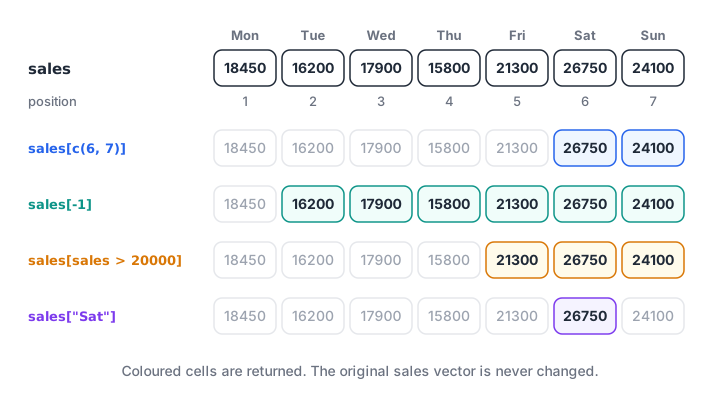
Four ways to index the same sales vector. Each returns a new vector and leaves sales unchanged.
sales[1]
sales[c(6, 7)]
sales[2:4]
sales[-1]
sales["Sat"]
sales[10] Mon
18450
Sat Sun
26750 24100
Tue Wed Thu
16200 17900 15800
Tue Wed Thu Fri Sat Sun
16200 17900 15800 21300 26750 24100
Sat
26750
<NA>
NA - Positive numbers keep those positions, in the order you list them.
- Negative numbers drop those positions.
sales[-1]is everything except Monday. - Names pick by label, which is clearer than remembering that Saturday is position 6.
- Out of range returns
NArather than an error, so checklength()when results look odd.
You can't mix positive and negative numbers in one index; R stops with an error.
Quick check
What does sales[-1] return for a vector of seven days?
A negative index drops that position, so you get elements 2 to 7.
How do you filter a vector by condition?
The most useful index of all is a logical vector. A comparison such as sales > 20000 returns one TRUE or FALSE per element, and putting it inside the brackets keeps only the TRUE positions.
sales > 20000
sales[sales > 20000]
which(sales > 20000)
sum(sales > 20000)
names(which.max(sales))
any(sales < 16000)
all(sales > 15000)
c("Mon", "Holi") %in% days Mon Tue Wed Thu Fri Sat Sun
FALSE FALSE FALSE FALSE TRUE TRUE TRUE
Fri Sat Sun
21300 26750 24100
Fri Sat Sun
5 6 7
[1] 3
[1] "Sat"
[1] TRUE
[1] TRUE
[1] TRUE FALSEThis is the core pattern behind filtering rows in a data frame and in dplyr later. which() turns TRUE positions into index numbers, any() and all() summarise a condition, and %in% checks membership in a set. Combine conditions with & (and), | (or) and ! (not).
Vectorised operations: maths on every element
In R, arithmetic and most functions automatically apply to every element. This is called vectorisation, and it replaces most of the loops you would write in other languages.
prices <- c(dal = 165, poha = 60, paneer = 90, sev = 120)
prices * 1.05
prices + c(5, 0, 10, 0)
round(prices / 3, 1)
sum(prices)
mean(prices) dal poha paneer sev
173.25 63.00 94.50 126.00
dal poha paneer sev
170 60 100 120
dal poha paneer sev
55 20 30 40
[1] 435
[1] 108.75Adding two vectors of the same length pairs them element by element: the first with the first, the second with the second. The result keeps the names from the first vector.
Vectorised code is also much faster than a loop over the elements, because the work happens in compiled C code inside R. Loops still have their place, and R if-else and loops covers when to use them.
What is recycling in R?
When two vectors have different lengths, R repeats the shorter one until it matches the longer. This is called recycling.
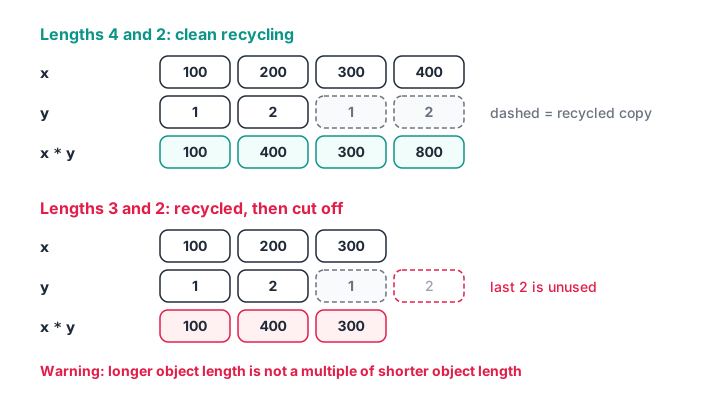
A length-2 vector recycles cleanly against length 4, but against length 3 it is cut off and R warns you.
c(100, 200, 300, 400) * c(1, 2)
c(100, 200, 300) * c(1, 2)[1] 100 400 300 800
[1] 100 400 300
Warning message:
In c(100, 200, 300) * c(1, 2) :
longer object length is not a multiple of shorter object lengthprices * 1.05 is recycling too: the single value 1.05 repeats for every price. That case is intended. The warning case is almost always a bug, so treat that warning as an error to fix.
Modifying and summarising a vector
Assigning to an index changes that element in place. Assigning beyond the end grows the vector, and c() joins two vectors together.
sales["Wed"] <- 18100
sales

weekend  <- sales[c("Sat", "Sun")]
weekdays_only <- sales[!names(sales) %in% c("Sat", "Sun")]
mean(weekdays_only)
mean(weekend) Mon Tue Wed Thu Fri Sat Sun
18450 16200 18100 15800 21300 26750 24100
[1] 17970
[1] 25425Weekend sales average about 7,450 rupees more than weekdays at this store, which is the kind of quick finding a manager acts on, for example by adding a cashier on Saturdays.
R's summary functions all take a vector and return a short answer or a reshaped vector.
sort(sales, decreasing = TRUE)
cumsum(sales)
diff(sales)
range(sales) Sat Sun Fri Mon Wed Tue Thu
26750 24100 21300 18450 18100 16200 15800
Mon Tue Wed Thu Fri Sat Sun
18450 34650 52750 68550 89850 116600 140700
Tue Wed Thu Fri Sat Sun
-2250 1900 -2300 5500 5450 -2650
[1] 15800 26750cumsum() gives a running total, useful for "how close are we to the weekly target?", and diff() gives the day-to-day change.
The same idea in Python
If you also work in Python, NumPy arrays behave much like R vectors. The main difference is that indexing starts at 0. You can run this block in the browser.
import numpy as np

sales = np.array([18450, 16200, 17900, 15800, 21300, 26750, 24100])
print("First day:", sales[0])
print("Over 20k:", sales[sales > 20000])
print("With 5% rise:", sales * 1.05)
print("Running total:", sales.cumsum())
print("Mean:", round(sales.mean(), 2))
Common mistakes with R vectors
- Using index 0.
sales[0]returns an empty vector, not the first element. Positions start at 1. - Mixing types by accident.
c(165, "60")makes everything text, so later maths fails. - Ignoring the recycling warning. It means your vectors have mismatched lengths, usually a data error.
- Dropping with
-which()when nothing matches. If no element matches,which()returns an empty vector andx[-which(...)]returns nothing. Usex[!condition]instead. - Using
=instead of==in a condition.sales[sales = 20000]doesn't compare; writesales == 20000. - Writing a loop for simple maths.
prices * 1.05is shorter, clearer and faster.
The -which() trap in action, with a condition that matches nothing:
x <- c(5, 10, 15)
x[-which(x > 100)]
x[!(x > 100)]numeric(0)
[1] 5 10 15Quick check
What is c(1, 2, 3, 4) + c(10, 20)?
The shorter vector is recycled to 10 20 10 20, and the lengths divide evenly, so there is no warning.
Key takeaways
- A vector is an ordered set of values of one type, created with
c(),:,seq()orrep(). - Indexing starts at 1 and accepts positions, negative positions, names or a logical condition.
x[x > value]is the core filtering pattern in R.- Arithmetic is vectorised, so one expression updates every element.
- Shorter vectors are recycled; a length warning almost always means a bug.
- Vectors hold one type only. To keep different types together, the next lesson covers R lists.
For more practice, work through vector exercises on Debugshala Test. Indexing and filtering questions come up often in analyst interviews.
FAQ
What is a vector in R?
A vector is the simplest data structure in R: an ordered collection of values that all have the same type, such as numbers or text. You create one with c(), for example c(165, 60, 90). Single values are vectors of length one, and columns of a data frame are vectors too.
Does R indexing start at 0 or 1?
R indexing starts at 1, so x[1] is the first element and x[length(x)] is the last. Using x[0] does not raise an error; it returns an empty vector of the same type. This differs from Python and C, which start at 0, so take care when switching languages.
How do I add an element to a vector in R?
Use c() to join the old vector with the new value, as in sales <- c(sales, 19500), or assign to the next position, such as sales[8] <- 19500.
The append() function can also insert a value after a chosen position. Growing a vector one element at a time inside a long loop is slow, so build it in one step where possible.
What is the difference between a vector and a list in R?
A vector holds elements of one type only, so mixing a number and text converts everything to text. A list can hold elements of any type, including other vectors, data frames and lists. Use vectors for columns of data and lists for collections of different things.
Where can I learn R vectors with guided practice in Indore?
Debugshala's data analytics classes at Old Palasia in Indore cover R and Python data structures with exercises on real datasets. You can book a free demo class first, and lessons are taught in English and Hindi. The analytics programme at Debugshala's Indore campus welcomes non-IT graduates too.
From the team behind this site
Go further with the Data Analytics Course at Debugshala
These tutorials are written by Debugshala, a training and placement institute at Old Palasia, Indore. The classroom course adds live mentoring, real projects and interview preparation.
- Offline classes at Old Palasia, Indore
- Free demo class before you pay
- Non-IT, fresher and year-gap friendly
- Placement assistance
700+ students placed · 200+ hiring partners · 4.9★ Google rating
